


Estimated reading time: 14 minutes
Table of contents
- Introduction
- Workflow Architecture Template
- Implementation Guide
- Step 1 – Define objectives, scope, and operating constraints
- Step 2 — Understand the input document landscape and design the data model
- Step 3 — Make platform and extraction model decisions
- Step 4 — Implement a minimal end-to-end “happy path”
- Step 5 — Add validation, routing, and human review logic
- Step 6 — Ensure production readiness, governance, and continuous improvement
- In Practice
- Conclusion
Introduction
In theory, modern enterprises should run on seamless system-to-system integration. Standardised APIs, shared data models, and event-driven architectures promise frictionless automation. And in many areas, this vision is already becoming reality.
In practice, however, some of the most critical workflows still revolve around documents. Operations in international shipping, customs and trade remain dominated by document exchanges across organisations and borders. In the pharmaceutical industry, batch records, quality certificates, and compliance documentation continue to circulate as PDFs, scans, and spreadsheets. Even with highly integrated internal systems, long system lifecycles and cross-company processes ensure that document-based handoffs remain a daily operational reality.
This persistence of documents reflects legacy systems, regulatory requirements, heterogeneous IT landscapes, and the need for legally valid, human-readable records. Advances in optical character recognition (OCR) and semantic extraction using modern language models now make it possible to reliably convert complex documents into structured, machine-readable data. While those technologies do not replace the need for proper system integration in the long run, they have their place as a pragmatic bridge between modern digital systems and document-centric processes in the short- and mid-run.
In this expert view, I explore how to design and operate automated OCR-based workflows in enterprise settings. Read on to get a reference workflow architecture and a practical implementation guide, highlighting key architectural decisions and platform trade-offs based on my project experience.
Workflow Architecture Template
The following workflow illustrates a common pattern found in document-driven automation processes. While implementations differ in detail, the core steps and decision points are largely consistent across platforms, industries and use cases.
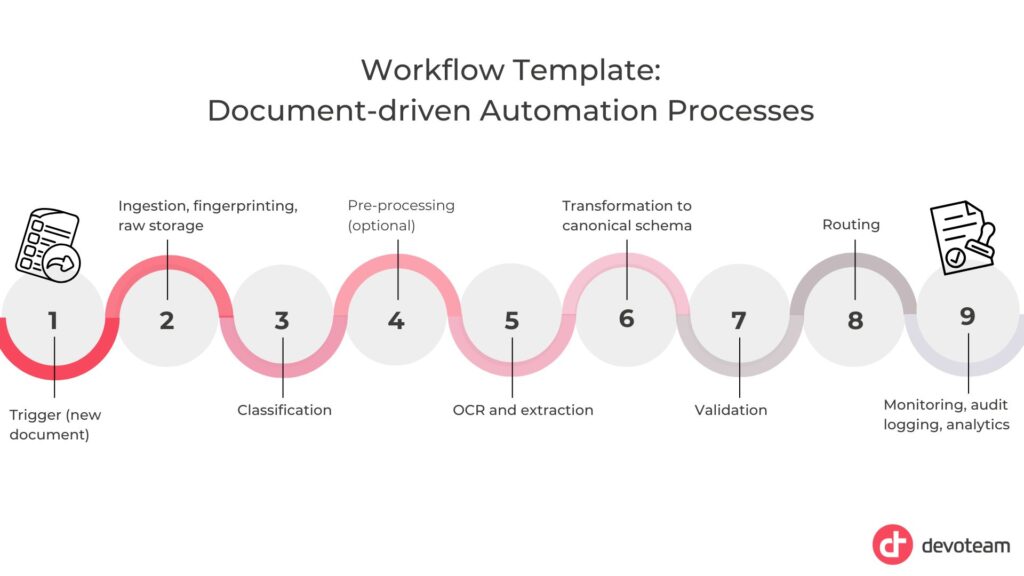
Let’s look closer at every step:
1. Trigger (new document)
A document enters the workflow via email, upload, scanner, or system handoff.
2. Ingestion, fingerprinting, and raw storage
The file is ingested, uniquely identified, and stored in its original form to ensure traceability and reprocessing.
3. Classification (document type)
The document is classified to determine processing logic, extraction model, and routing.
4. Pre-processing (optional)
Image and layout normalisation steps (e.g. de-skewing, rotation, splitting) improve extraction quality.
5. OCR and extraction (fields and tables)
Text, key fields, and tabular structures are extracted and enriched with confidence information.
6. Transformation to canonical schema
Extracted data is mapped into a standardised data model aligned with downstream systems.
7. Validation (rules and confidence)
Business rules and confidence thresholds determine acceptance, review, or rejection.
8. Routing
Routing translates validation results and confidence assessments into an operational decision. It determines how a document proceeds through the workflow based on risk, data quality, and business rules, balancing automation efficiency with control and accountability. There are basically three options:
- Auto-accept: When confidence thresholds are met, and all validation rules pass, the extracted data is written to the target database, and downstream systems are notified or updated automatically.
- Human review: When confidence is insufficient or validation rules fail, the document is routed to a review queue where corrections are applied. All changes are audited before the corrected data is written to the database.
- Reject: When a document is unreadable, unsupported, or non-compliant, system archives it with a clear rejection reason and relevant stakeholders are notified with guidance on next steps.
9. Monitoring, audit logging, and analytics
All steps are logged to support compliance, operational monitoring, and continuous improvement.
Although the workflow architecture looks simple at first glance, its successful implementation requires careful planning and a series of informed decisions. In the following section, I give you a step-by-step guide, highlighting practical considerations and trade-offs based on project experience.
Implementation Guide
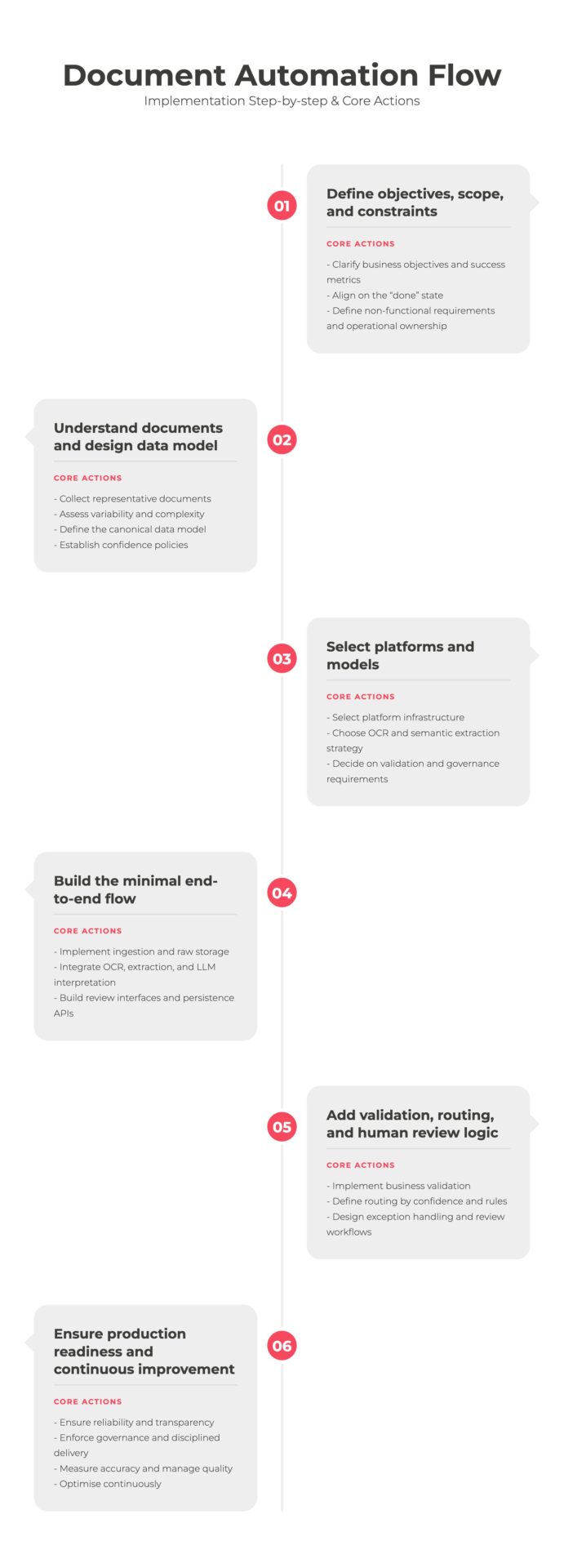
We have established the workflow, now it’s time for step-by-step implementation. Start with the overview chart below, and then we will explore each step.
Step 1 – Define objectives, scope, and operating constraints
1.1 Clarify the business objectives
Begin by clearly defining the business transaction you are automating, such as customs document ingestion in shipping or batch record processing in pharmaceutical operations. This should go beyond document type and clearly describe the business outcome that the workflow must deliver. Define which manual steps the automation will replace and what success looks like from a business perspective, including concrete improvement targets such as reducing customs clearance times, lowering manual review effort in quality documentation, or improving compliance reporting accuracy. Clear objectives and success metrics align business, IT, and compliance stakeholders and ensure the workflow delivers measurable business value rather than isolated document automation.
1.2 Align on the “done” state
Define what “done” means in system terms. This includes which database tables must be populated, how header and line-item data are represented, how attachments and audit records are stored, and which downstream systems will consume the data. Ambiguity at this stage often leads to rework later, particularly when downstream systems impose stricter data requirements than initially anticipated.
1.3 Define non-functional requirements and ownership
It’s essential to establish non-functional requirements early. Expected document volumes, peak loads, latency expectations, and availability targets directly affect architectural choices. Compliance constraints such as data protection regulations, retention periods, auditability, and data residency may rule out certain platforms or cloud regions. Finally, we need to define the operational ownership upfront: who monitors the pipeline, who handles failures, and who approves exceptions.
Step 2 — Understand the input document landscape and design the data model
2.1 Collect representative documents
We start by collecting a representative document sample set, including low-quality scans, edge cases, and uncommon variants. Projects that rely only on “happy path” samples tend to underestimate extraction complexity and exception rates.
2.2 Assess variability and complexity
We need to assess document variability. Fixed templates enable simpler extraction approaches, while supplier-specific or highly variable layouts push the solution toward more advanced layout models and semantic interpretation. Tables, handwriting, multiple languages, and multi-page documents materially affect both accuracy and cost.
2.3 Define the data model
In parallel, define the target data model. A canonical pattern typically separates document metadata, extraction runs, header entities, line-item entities, and validation or audit events. This separation supports traceability and reprocessing but introduces additional schema complexity. It’s crucial to explicitly document mapping rules for field formats, normalisation (for example, currencies or tax handling), and reconciliation logic.
2.4 Establish confidence policies
At this stage, we also need to define confidence policies. These policies translate extraction scores into operational decision, determining when to accept data automatically, trigger a human review, or reject a document entirely.. They typically combine per-field thresholds, document-level thresholds, and sampling strategies for spot checks. For example, critical fields such as invoice totals or patient identifiers may require ≥99% confidence, while non-critical fields may accept ≥90%, and any document falling below a combined 97% threshold is routed for review. The trade-off is between automation rate and risk tolerance: higher thresholds reduce errors but increase manual workload.
Step 3 — Make platform and extraction model decisions
3.1 Select the platform infrastructure
With document and data requirements clarified, we can move to architectural decisions, including the choice of a platform that will orchestrate the automated workflow. At this stage, the goal is not to select the “best” tool, but to understand how different platforms shape workflow design, governance, and operational responsibility. Platforms such as n8n, Microsoft Power Platform, and Snowflake represent three distinct architectural styles.
Let’s take a quick look at what each of them offers:
| Platform | Core Focus | Best For | Trade-offs |
| n8n | API-driven orchestration & system integration. | Gives a flexible execution engine and a large library of connectors, allowing to build highly customised pipelines including SaaS platforms, on-prem systems, and bespoke services. Good for integration-centric orchestration and heterogeneous environments where documents flow between many systems and custom services. | Trade-offs in governance and user-facing review, which typically require explicit design and additional components. |
| Microsoft Power Platform | Low-code app dev & Microsoft ecosystem integration (Microsoft 365, SharePoint, Dynamics, and Azure). Talk to our Microsoft experts! | Offers visual workflow orchestration, rapid application development, and native capabilities for building user-facing review and exception-handling interfaces. Optimised for business-facing workflows integrated with Microsoft services. Performs best when document structures are reasonably stable and when collaboration between IT and business users is a core requirement. | Trade-offs in scenarios that demand highly customised extraction logic, the embedding of external LLMs, attaching documents to Microsoft Copilot prompts, complex table reconstruction, or fine-grained control over execution behavior. |
| Snowflake | A cloud-native data platform designed for scalable data storage, processing, and analytics. In document processing architectures, it serves as the central data backbone Talk to our Snowflake experts! | Snowflake-based approaches position document processing close to the data layer and are particularly effective when extracted data is primarily consumed by analytics, reporting, or data products. It offers strong scalability, governance, and lineage, and can support OCR and extraction via integrated services or external calls. | Snowflake is not a workflow or UI platform by default; orchestration and human review require complementary tools, such as external workflow engines or Streamlit-based interfaces. The latter requires advanced Python skills for app development. |
3.2 Picking the right model for OCR and semantic extraction
Selecting models for document processing is an architectural decision that directly shapes automation rates, operational risk, regulatory compliance, and long-term maintainability. In practice, organisations must decide not only which models to use, but also how to distribute responsibilities between OCR, layout interpretation, semantic understanding, validation, and human review. Fortunately, modern LLM platforms such as GPT, Gemini, or Microsoft Copilot already embed native OCR and multimodal document understanding capabilities, allowing them to directly ingest documents and scanned images. In these models, OCR, layout interpretation, and semantic reasoning are performed within a single inference step, eliminating the need for separate OCR engines and significantly simplifying system architecture.
At a high level, two strategic approaches dominate enterprise architectures:
- Off-the-shelf multimodal LLMs
- Fine-tuned and custom-trained models
These approaches represent different trade-offs between speed, control, accuracy, explainability, and governance.
Option A — Off-the-shelf multimodal LLMs
This approach offers exceptional speed of implementation and conceptual simplicity. It enables rapid prototyping, fast iteration, and low integration effort, making it highly attractive for early-stage automation, exploratory workflows, and user-facing document interaction. In many cases, multimodal LLMs can achieve acceptable accuracy for end-to-end extraction without additional components.
However, this tight integration introduces structural trade-offs. Intermediate artefacts such as raw OCR text, bounding boxes, or reconstructed layouts are typically inaccessible, reducing transparency, explainability, and fine-grained validation. Deterministic behaviour is harder to enforce, we have a limited confidence calibration, and auditability becomes more complex. As a result, embedded OCR within LLMs is best for low-risk workflows, assisted automation, and knowledge-centric use cases, rather than highly regulated or mission-critical production pipelines.
Option B — Fine-tuned and custom-trained models
This approach encompasses both fine-tuning general-purpose LLMs and training domain-specific extraction models, including OCR and layout models. The goal is to achieve higher determinism, accuracy, and domain alignment than off-the-shelf multimodal LLMs can typically provide.
Fine-tuning is particularly effective when workflows require:
- Highly consistent output formats
- Stable classification behaviour
- Enforcement of domain-specific terminology
- Predictable schema mapping at scale
Custom-trained extraction models extend this approach further, enabling domain-optimised OCR and layout understanding. These models are justified when:
- Standard OCR and LLM pipelines fail to reach acceptable accuracy
- Document layouts are highly specialised
- Regulatory or compliance requirements demand deterministic extraction
- Business impact justifies the engineering investment
While these approaches can significantly improve accuracy and reliability, they introduce substantial operational overhead. Training data must be curated and labelled, models must be versioned and regression-tested, and deployment pipelines must support controlled rollout and rollback. Long-term maintenance, drift monitoring, and compliance validation become continuous responsibilities.
This approach works best for pharmaceutical batch records, laboratory documentation, clinical trial records, regulatory submissions, specialised engineering documentation, and other mission-critical workflows.
3.3 Decide on validation and governance requirements
Validation design should start by determining where human-in-the-loop review is mandatory and where automation can safely operate end-to-end. Human review is essential when documents contain critical data, when error tolerance is low, when regulatory or compliance requirements apply, or when model confidence falls below defined thresholds. In these cases, we need intuitive user interfaces so business users can efficiently review, correct, and approve extracted data before it is written into operational systems and databases.
Conversely, fully automated processing is appropriate when document structures are stable, confidence levels are consistently high, and business risks are limited. Even in these scenarios, clear audit trails, monitoring, and fallback mechanisms remain necessary. Across both cases, security, access control, logging, and environment separation must be designed alongside the model strategy, as different levels of automation imply different requirements for governance, compliance, and operational oversight.
Step 4 — Implement a minimal end-to-end “happy path”
4.1 Implement ingestion and raw storage
Implementation should start by building a simple yet complete flow that covers the full path from document intake to writing structured data to the database for a limited, representative set of documents. At this stage, the focus shifts from architectural choices to reliable execution. We should now implement triggers, connectors, and ingestion pipelines according to the previously defined design.
Ingestion includes connecting to source systems, standardising file formats, and generating stable document identifiers to prevent duplicates and enable safe reprocessing. Early format normalisation simplifies downstream processing, improves extraction quality, and reduces operational complexity.
Implement raw document storage from the outset. Store original files in immutable storage and apply retention tagging where required. Retaining raw documents is essential for traceability, audits, and troubleshooting. Systems that persist only extracted data quickly lose transparency and make error analysis and regulatory compliance significantly harder.
4.2 Integrate OCR, extraction, and LLM interpretation
Time to integrate OCR and data extraction, including optional image pre-processing when scan quality varies. The output should include extracted text, key fields, tables, and confidence values.
When we use LLMs for interpretation, prompt design becomes part of the implementation. Prompts should clearly define expected output formats, field definitions, normalisation rules, and error handling behaviour. Prompt templates should be versioned and tested like software code, as even small changes can affect results.
Store all extraction outputs in a staging layer before database persistence. This enables debugging, quality checks, and safe reprocessing without re-running the full pipeline.
4.3 Build review interfaces and persistence APIs
For workflows that require human review, we need simple and clear user interfaces. Review screens should show the original document next to extracted values and, optionally, confidence indicators, allowing users to quickly verify and correct results. Good UI design directly reduces review time and operational cost.
At the same time, APIs should be built to write validated data into target databases and downstream systems. These APIs must support duplicate-safe writes so that reprocessing does not create duplicate records.
At this stage, we should already have implemented basic error handling, capturing failures and routing them into structured queues with enough detail to support troubleshooting.
Step 5 — Add validation, routing, and human review logic
5.1 Implement business validation
Once the happy path is in place, we need to add business validation rules. These typically include required field checks, data type validation, cross-field consistency checks (such as totals matching line items), and master data verification. In production, validation errors are often a larger source of issues than OCR mistakes.
5.2 Route documents based on confidence and rules
Routing logic determines how documents move through the workflow. The system processes documents automatically when they meet high confidence levels and pass validation rules. If confidence is low or rules fail, the system routes the documents to human review. Clear threshold definitions are essential to balance automation rate and business risk.
5.3 Design exception handling and review workflows
Treat exception handling as a core workflow, not as an afterthought. Review queues must present extracted data, confidence indicators, and rule failures in a way that supports fast and accurate correction. All corrections must be logged with full audit trails before the data is written into operational systems.
Step 6 — Ensure production readiness, governance, and continuous improvement
6.1 Ensure reliability and transparency
Once the workflow is functionally correct, the focus shifts to making it reliable, transparent, and sustainable in daily operations. This requires clear monitoring of processing volumes, processing times, automation rates, and error patterns, so that issues can be detected early and resolved quickly. Being able to track each document through the full workflow is essential for troubleshooting and audit purposes. We should always test our systems under realistic load and failure scenarios to ensure they remain stable during peak usage and temporary outages.
6.2 Enforce governance and disciplined delivery
Strong governance and disciplined delivery practices are equally important. We must enforce data retention rules, protect sensitive information, and clearly separate development, testing, and production environments. Version control, controlled releases, and rollback procedures ensure we can introduce changes safely without disrupting business operations.
6.3 Measure accuracy and manage quality
Long-term success depends on continuous quality management. A reference set of verified documents enables objective measurement of extraction accuracy and helps identify regressions early. Over time, new document layouts, suppliers, or scanning conditions may reduce performance, making regular monitoring and adjustment essential. Feedback from human review should be systematically incorporated to refine models, rules, and thresholds.
6.4 Optimise continuously
Finally, workflows should be continuously optimised to increase automation and control costs. This includes fine-tuning confidence thresholds, validation logic, and pre-processing steps, as well as routing only complex cases to more advanced and costly processing methods. Over time, this turns document automation into a self-improving operational capability rather than a static system.
In Practice
As a premium AI-driven tech consulting company, Devoteam helped over 300 companies to transform their businesses with AI. Discover how data extraction and workflow automation projects deliver measurable impact in real-world scenarios through our projects:
Pupuk Indonesia successfully streamlines Data Extraction Process time
From Manual Classification to Intelligent Accuracy: GS1 Mexico’s AI-Powered Transformation
How Document AI streamlined water, gas and electric billing for a Real Estate Investment Trust (REIT)
Conclusion
Despite the push for seamless digital integration, enterprises in highly regulated sectors still rely on documents as a “pragmatic bridge” for cross-company processes. Modern automation is all about building a robust architectural pipeline that converts messy scans into machine-readable truth. Organisations must move from static scanning to “self-improving” pipelines to unlock true operational resilience. Those who master clear business focus, thoughtful architecture, and disciplined operational design will be rewarded with efficiency, quality, and resilience across their document-driven processes. Hopefully, my step-by-step guide will help you achieve just that.

Stop losing 40% of your operational capacity to manual document review
Every day your team spends correcting PDF errors is a day of lost scalability. Contact our experts and eliminate the ‘manual tax’ on your growth.