






ServiceNow’s latest release Yokohama is here. In this article, you will learn about the key features in the ServiceNow IRM portfolio which will bring the most business value to your organisation.
What you’ll find in this article:
Smart Assessments
The Yokohama release introduces a significant leap in the configuration and automation capabilities of Smart Assessments. Built into the newly enhanced Assessment Workspace, these improvements allow risk and compliance teams to design, manage, and operationalise assessments more efficiently — with minimal scripting or customisation required.
Effortless template building with the new UI
The most visible and user-friendly improvement is the Template Builder, which now provides a single, unified interface for constructing assessment templates. With drag-and-drop functionality and an intuitive layout, assessment creation becomes much faster and more accessible — even for users with limited platform experience.
No more jumping between tables or configuring related records manually. Sections, subsections, and questions can be created directly in context, and a new search capability helps users quickly find and edit specific items in large assessments.
This aligns with ServiceNow’s goal to simplify and centralise risk and compliance design activities into a single Workspace.
Template copy & scoring
One of the most requested features — the ability to duplicate templates — is now available. With Template Copy, users can take an existing assessment structure and reuse it as a base reference, then modify it as needed.
This is especially valuable for organisations conducting similar assessments across different entities, business units, or geographies. Instead of rebuilding templates from scratch, customers can now iterate on a proven structure, ensuring consistency and saving significant time.

Scoring: Now configurable and transparent
The new Flexible Scoring Engine allows scores to be calculated at the question, section, or entire template level. These scores can be used not only for benchmarking but also for triggering follow-up workflows such as issue creation or reassessment.
Scoring logic supports:
- Simple averages and weighted scores
- Answer-level score assignment (e.g., Yes = 10, No = 0)
- Roll-ups from questions → sections → overall score
While the formula builder is expected in a future release, the current logic is already robust enough for most GRC needs — and more transparent than the script-heavy solutions used previously.
Response Automation & Post Assessment Actions
Automating field logic used to require scripting or UI Policies. Now, it’s handled entirely in the template through Response Automation. Based on user answers, fields can be:
- Shown or hidden
- Made mandatory
- Auto-populated with data from other questions or records
For example, if a user selects a critical risk score, a “Justification” field can appear automatically. Or if a question’s answer is already stored elsewhere in the platform (e.g., in an Incident or Risk record), the value can be filled in dynamically — without needing the user to answer again.
Post Assessment Actions – Workflow integration built-in
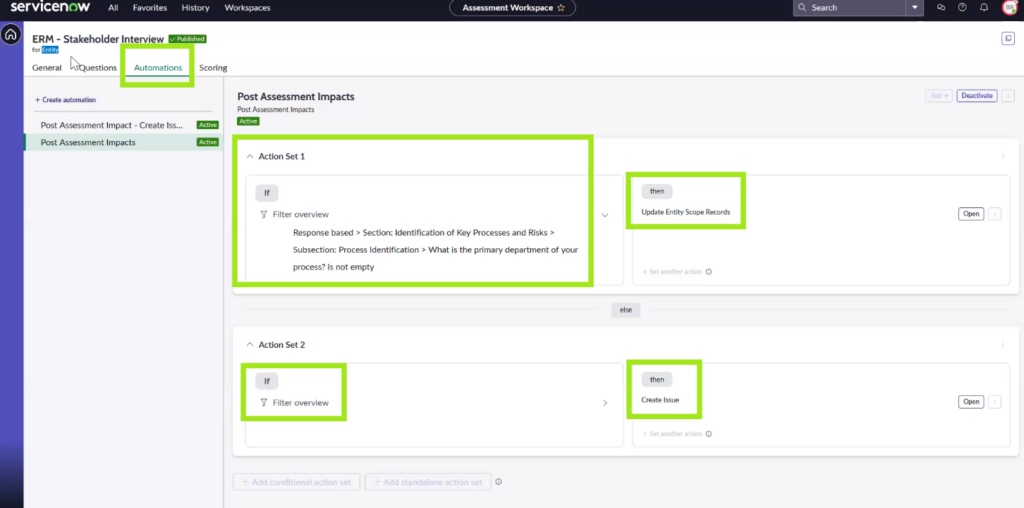
A standout capability in ServiceNow Yokohama is Post Assessment Actions. This allows assessments to automatically trigger downstream actions like:
- Creating issues or tasks
- Mapping risks or controls
- Launching new assessments
- Sending notifications
This is all managed through native Flow Designer integration, meaning complex logic can be built without code. This not only reduces manual follow-up but ensures assessments lead to real operational outcomes — faster and more consistently.
A consultant’s perspective
As someone who has spent hours with customers creating assessment templates, I can say with confidence that this is a major step forward. Before Yokohama, we often had to:
- Create new fields just to capture things like guidance or justification
- Script scoring logic
- Build Business Rules for post-assessment workflows
- Explain to customers why so much customisation was required
Now? Most of that is out-of-the-box and configurable. The time-to-value is drastically reduced, and the admin effort is lower. For anyone who’s worked with assessments in the past, the difference is clear — this workspace makes building assessments not just easier, but enjoyable.
One known limitation: No preview (yet)
At the time of the Yokohama release, preview functionality is still missing. This means you cannot easily test how the assessment will look to the end user before publishing it. While this doesn’t block adoption, it’s a notable gap and something we hope to see addressed in a future release.
Policy and Compliance Management
The Yokohama release brings meaningful usability upgrades to Policy and Compliance Management, with a strong focus on simplifying collaboration and document management across platforms.
Enhanced policy redlining
Collaboration on policy documents is now easier and more flexible. In addition to existing support for Microsoft SharePoint and OneDrive, Yokohama introduces integration with Google Docs for redlining. This allows teams using Google Workspace to co-author and review policy changes without leaving their preferred environment.
This enhancement makes policy collaboration truly cross-platform, supporting more organisations with diverse tooling.
Streamlined document uploads
Users can now upload policy drafts directly into the connected cloud storage (Google Drive, SharePoint, or OneDrive) from within ServiceNow. There is no need to navigate away from the platform to manage source documents. This improvement ensures that policies remain linked to their authoritative source and version-controlled throughout the policy lifecycle.
More control over policy text sync
For large organisations with lengthy or complex policy documents, Yokohama introduces the option to disable the automatic synchronisation of policy text between ServiceNow and the linked document. This gives admins greater control over performance and content updates while maintaining traceability of source material.
Risk Management
Composite Entity
ServiceNow GRC’s Composite Entities, introduced in the Yokohama release, significantly enhance the management of complex organisational structures and their associated risks.
Composite Entities allow you to combine different organisational elements, like a specific department and a particular location, into a single entity. This enables a much more detailed and accurate risk and compliance analysis tailored to complex organisational structures.
Addressing complexity
Modern organisations face intricate risks and compliance needs that often span multiple entities (e.g., a risk affecting a specific department within a particular location). Composite Entities address this by enabling risk and compliance management at the intersection of these multiple entity dimensions.
Multi-dimensional risk management
This feature allows combining different organisational “dimensions” (like departments, locations, and processes) for a more granular and accurate view of risk, leading to more precise risk assessments and control implementations.
Key benefits:
- Enhanced granularity – Provides a more detailed understanding of risk exposure by considering combinations of entities.
- Improved risk assessment – Enables more targeted and effective risk assessments by focusing on specific entity combinations.
- Streamlined compliance – Facilitates compliance management across complex organisational structures by allowing policies and controls to be applied to combined entities.
- Automated aggregation – Automatically aggregates risk and compliance data across related entity hierarchies, providing a consolidated view.
- Better risk mapping – Empowers users to link relevant risks and controls to both single and composite entities for use in assessment projects.
Licensing: Composite Entities are part of the GRC: Advanced Risk application within ServiceNow.

Risk Assessment Project
In the ServiceNow Yokohama release, Risk Assessment Projects represent a significant evolution in how organisations approach risk evaluation. Here’s a breakdown of what that entails:
Core concept:
- Structured risk evaluation – Risk Assessment Projects provide a structured framework for conducting comprehensive risk assessments. This allows organisations to move beyond ad-hoc evaluations and implement a more systematic approach. It is about creating a project around the risk assessment process, to better organise, and control the assessment.
- Enhanced visibility – These projects aim to improve visibility into an organisation’s risk exposure, especially within the context of specific projects or initiatives. By integrating risk assessment into project management workflows, organisations can proactively identify and mitigate potential risks.
- Integration – A key aspect of this enhancement is the integration of risk assessment with Project Portfolio Management (PPM). This allows for a more holistic view of risk across the organisation’s project portfolio. The Integration of Project portfolio management, and advanced risk, allows for better overall risk posture visibility.
- Key capabilities:
- Reassessment – A key enhancement is the ability to reassess completed risk assessment projects. This allows organisations to re-evaluate risks based on new insights, changing conditions, or updated information.
- Automated enhancements – The underlying risk engine has been enhanced to automate assessment responses and generate more meaningful risk scores, improving efficiency and accuracy.
- Improved risk scoring – The system can generate more meaningful assessment scores, based on responses, and data types.
Risk Assessment Projects in the Yokohama release provide a more organised, integrated, and dynamic approach to risk management. This empowers organisations to:
- Gain a clearer understanding of their risk landscape
- Make more informed decisions
- Improve their overall risk posture
AI Agents for Integrated Risk Management (IRM) with Issue Summarisation
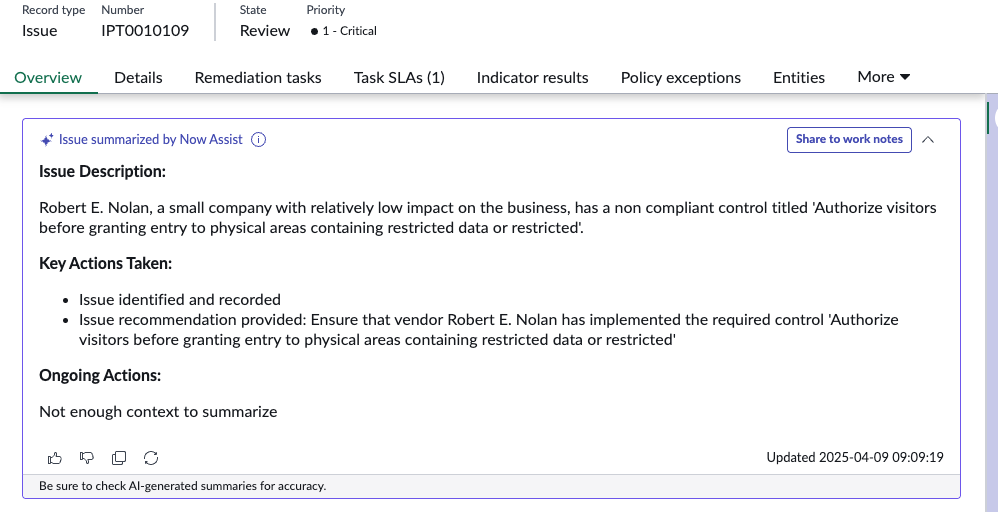
The “AI Agents for Integrated Risk Management (IRM) with Issue Summarisation” feature in the ServiceNow Yokohama release represents a significant step forward in leveraging generative AI to enhance GRC workflows. Here’s a breakdown of what it entails:
- Generative AI integration – This feature incorporates generative AI capabilities directly into the IRM module, specifically focusing on streamlining issue management. It’s part of ServiceNow’s “Now Assist” family of AI-powered features.
- Issue Summarisation – The primary function is to provide quick and concise summaries of complex issues within the IRM system. This helps GRC teams to rapidly grasp the key details of an issue without having to sift through extensive documentation.
- Enhanced Issue Lifecycle Management – The AI agents aim to improve efficiency throughout the entire issue lifecycle, from initial identification to resolution. This includes:
- Accelerating the understanding of issue status
- Facilitating the alignment of actions and responses
- Enabling more informed decision-making
Key benefits

Increased efficiency
Reduces the time spent on manually reviewing and summarising issue details.

Improved decision-making
Provides quick access to critical information, enabling faster and more accurate decisions.

Streamlined workflows
Simplifies and enhances the overall issue management process.

Better understanding of issues
Allows users to quickly gain context and understanding of the issue at hand.
AI Agents for Integrated Risk Management (IRM) with Issue Summarisation feature leverages AI to automate the process of summarising complex issue information, allowing GRC teams to focus on more strategic tasks. This leads to faster resolution times, and better overall risk management.
Operational Resilience
Digital resilience incident reporting
A new feature coming with the Yokohama release as part of the Operational Resilience application enables reporting critical incidents to the regulator (relevant to DORA regulation). Digital Operational Resilience Act (DORA) is a European Union regulation that is applicable from January 17, 2025. It enhances the ICT security of financial entities and it protects the financial sector from major digital disruptions.
5 pillars of DORA (Digital Operational Resilience Act)
ICT Risk Management
ICT Incident Reporting (covered here)
ICT Third-Party Risk
Management
Information and Intelligence Sharing
Digital Operational Resilience testing (Operational vulnerabilities)
Users of the Operational Resilience Workspace can report ICT-related incidents to regulators using the Digital resilience incident reporting module (DRIR). To ensure adherence to regulatory standards, the DRIR application integrates with Incident Management and Security Incident Response. When a critical Digital Resilience Incident (DRI) is detected and recorded within those applications, a corresponding reporting case is automatically generated or updated. The report is generated in the specified format and shared with regulators.
Example of incident assessment:

You can generate an initial report in Excel format within 24 hours, an intermediate report within 72 hours, and a final report within 1 month. The exported file includes tabs for each section of the questionnaire with questions and responses.
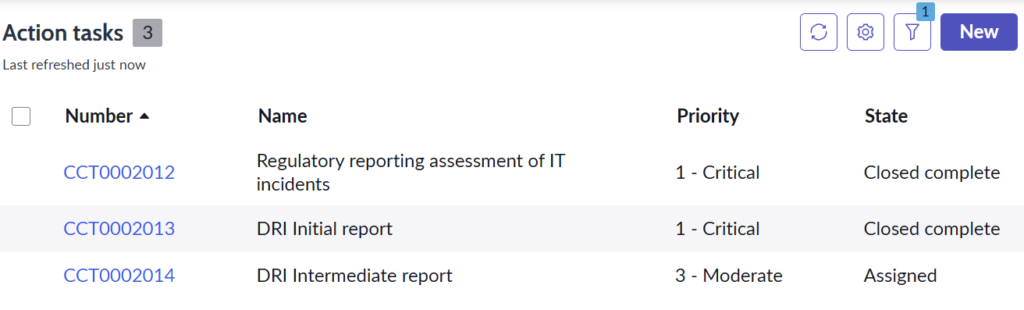
Incident workflow:

Key features of DRIR:
- Creates reporting cases automatically
- Initiates a structured assessment process
- Uses automated reporting workflow to generate reports
- Exports incident reports in the format specified by regulatory authorities
- Integration with Incident Management or Security Incident Response
Financial entities can report critical ICT incidents to regulators through Digital resilience incident reporting, adhering to the DORA. This helps protect the stability of the financial sector from major digital disruptions by enhancing ICT security.
Licensing: IRM Professional, IRM Enterprise, plugin: Digital Resilience Incident Reporting and GRC: Operational Resilience application.
Third-Party Risk Management
Third-party questionnaire responses via Excel
The Yokohama release introduces a significant enhancement to the Third-party portal with the addition of an import of completed third-party questionnaires. This new feature allows third parties to respond to risk assessment questionnaires by utilising an Excel template. This provides an alternative method for external users to provide the necessary information, potentially making the process more convenient and accessible for a wider range of individuals.
Third-party or internal users can download the assessment as a pre-formatted Excel template directly from the portal or workspace. They can then complete the questionnaire offline and upload it back.
No impact on the license (available for all plans).

TPRM personalised dashboards: enhanced data exploration and analysis
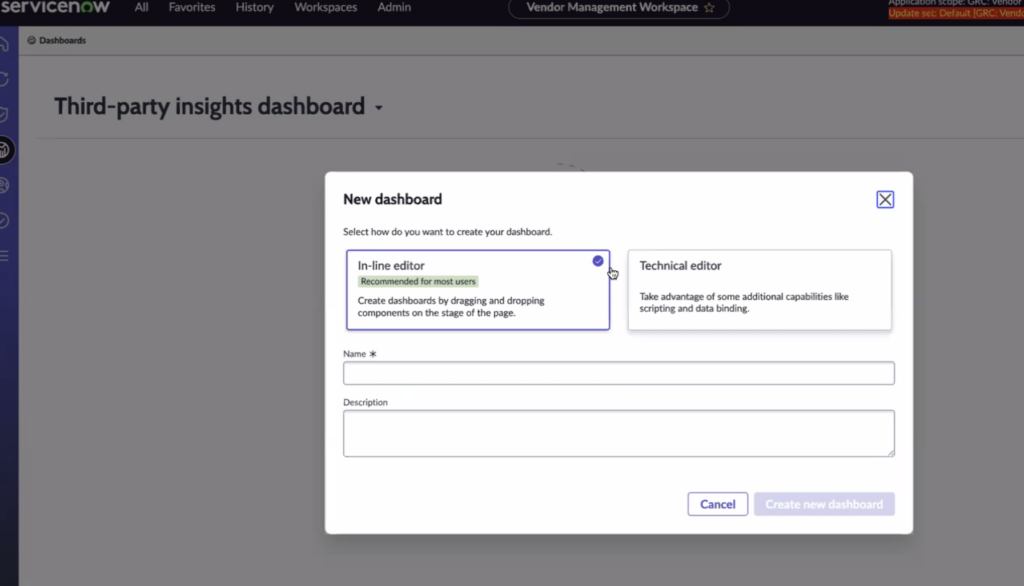
A key enhancement in the Yokohama release is the introduction of personalised dashboards for users providing dedicated spaces for exploring and analysing TPRM data. This allows individuals responsible for overseeing and evaluating third-party risks to gain a clearer understanding of their data landscape.
Furthermore, the new functionality extends beyond pre-built dashboards. Users with specific roles are now empowered to create and share their own dashboards and reports. This capability for customisation allows users to tailor their analytical views to focus on the metrics and key performance indicators that are most relevant to their specific responsibilities and the unique risk profiles of their third-party portfolio.
The ability to modify report layouts, widgets, and underlying data views provides a significant degree of flexibility, enabling a more personalised and effective approach to risk monitoring and decision-making. This shift towards user-driven analytics signifies a move towards making data more accessible and actionable for those directly involved in managing third-party risks.
No impact on the license (available for all plans).

BCM
Smart Assessments for Business Impact Analysis (BIA) templates
SN made significant updates to Business Continuity Management. Once again, SN has integrated the Smart Assessment Engine capabilities into BCM so customers can more easily update and assess their business impact analysis.
The system allows you to configure various categories and risk impact levels, automatically assigning a single, consolidated value. You can easily create and distribute questionnaires to specific individuals. Leveraging the Smart Assessment Engine, this functionality streamlines Business Impact Analysis through enhanced automation and a refined user experience.
- Leverage Smart Assessments capabilities, copy templates, prefill answers, scoring functions, filtering, etc. within BIA templates.
- Configure logic to calculate the RTO, RPO, Recovery Tier, CIA values based on the BIA responses.
- Enhanced user experience for building BIAs to address varied continuity requirements.

Generation of BIA reports to see how value was calculated for impact analysis and review what-if scenarios. Translation of impact into values to generate complex what-if scenarios for further analysis.
Licensing: BCM Standard or Professional
ESGM
ESG forecast planning & analysis
One of the major updates is ESG forecast and planning analysis. This feature gives organisations the ability to create multiple what-if scenarios or models using different inputs to see the impact on the business.
ESG managers can change a factor or calculation for emissions and quickly see how it affects different scenarios going forward. Predefined models help forecast these future scenarios and metrics so teams can better understand the impact on ESG initiatives.
How does it work in practice? First of all, create multiple what-if scenarios to model potential future change and then compare future impacts by creating multiple what-if scenarios:
- Enables comparisons of multiple what if analyses, showing how different inputs affect outcomes over different time periods.
- Ability to adjust variables (e.g., energy consumption, emission factors) to assess potential changes and impact.
- Provides pre-defined models to forecast data for metrics analysis.

The usage of pre-defined models to forecast different future scenarios and metrics will allow you to better understand the impact of change on ESG initiatives. Customers can adjust their specific variables, like energy consumption and emission factors, and then assess potential changes over time to make better decisions about future investments.
Licensing: Standard
Conclusion
In conclusion, the ServiceNow Yokohama release represents a substantial advancement in AI-powered risk management. Key enhancements across the IRM suite, including AI-driven issue summarisation, streamlined assessment template building, and the introduction of Composite Entities, offer powerful tools to optimise risk and compliance programs across the whole organisation.
The improvements to automation, workflow integration, and reporting capabilities will empower your teams to operate more efficiently, gain deeper insights into the risk posture, and make more informed decisions. By leveraging these features, you can not only mitigate risks more effectively but also drive greater business resilience and achieve a stronger overall governance framework.