

This post focuses on the ‘Experiment more often’ design principle contained in the Performance Efficiency pillar of the AWS Well-Architected Framework.
‘Fail fast’ is a term often banded around without any real context or actionable advice – it’s a bit of a buzz phrase. Building on AWS opens opportunities for teams to test ideas quickly without committing to expensive hardware or services. This post will explore how you can actually ‘fail fast’ using AWS services, helping you experiment in AWS more effectively and reach the right conclusion quicker.
AWS Well-Architected Framework
Gone are the days of buying physical hardware to test an idea, only for the test to be in vain. Organisations ended up with rooms and rooms of perfectly good equipment that just didn’t do what someone thought it would. With AWS, you can rent infrastructure for just the minutes or even seconds you need it, instead of spending thousands of pounds verifying whether an idea might work. The financial benefits that come with this are huge, and that’s before considering the increased productivity and empowerment of developers.
Why run experiments?
So, why should you run experiments on AWS? AWS continually innovates by introducing new features and services for customers to use, earning a reputation for moving fast as an organisation. By extension, standing still when using AWS means that, over time, you will end up going backwards. It only takes one short look at the What’s New with AWS? page to feel overwhelmed and unable to keep up.
Most of the features announced by AWS won’t be relevant to you. At their scale with lots of independent teams, there is inevitably a high velocity of new features. The good news is that there’s an easy way to keep on top of all this. Experiment!
Experimenting is a key enabler for continuous improvement of your AWS architecture. When running regular experiments and embracing a culture of innovation, your organisation can adopt new, useful features and services at the earliest sensible opportunity. Making the most of AWS’s innovation is a key benefit to being in the cloud; without that continuous improvement, your workload may miss out on major improvements.
Running experiments

We know why it’s important to experiment within AWS, but how do we actually do it in a safe and cost-effective way?
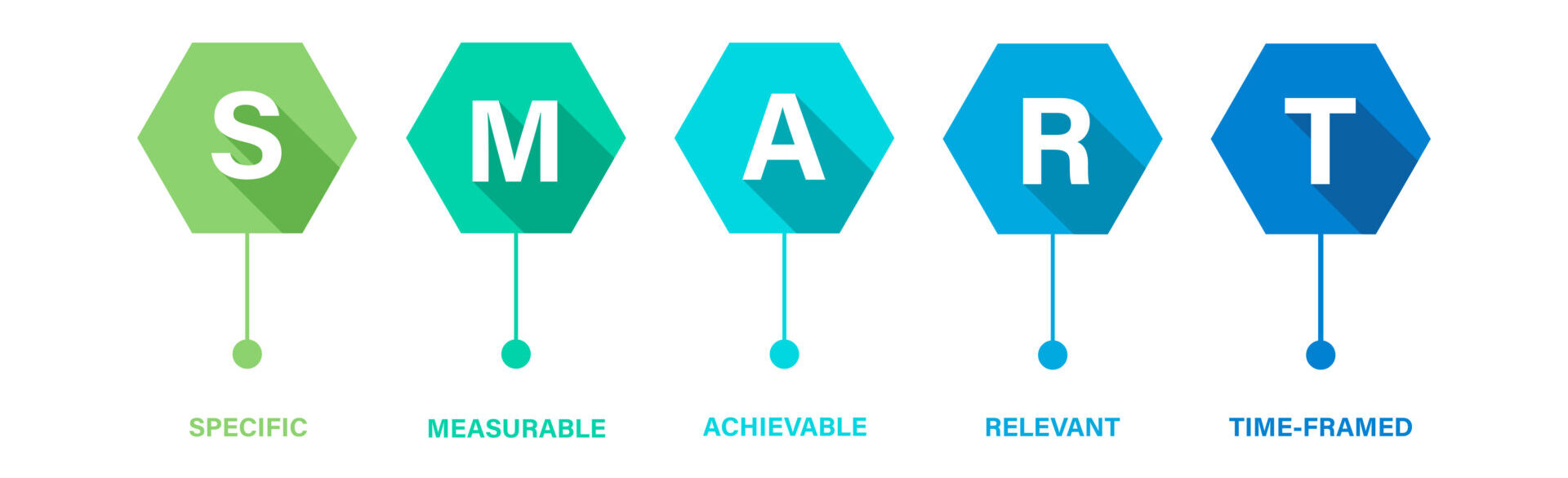
When running experiments, some prerequisites must be thought about first. A best practice is to reuse the SMART acronym when it comes to discussing all the things that an experiment should be:
- S. It should be specific. Limit the scope of the experiment to avoid anyone making “you could argue it was successful” statements afterwards.
- M. Determining the experiment’s success should be measurable; if you can’t gather quantitative data, try re-designing the experiment to make it possible.
- A: There’s no purpose in experimenting if it’s not achievable. If you’re conducting an experiment and already know the outcome (e.g., it’s going to fail), then it’s best not to frame it as an experiment. Pushing boundaries through experiments is good. Nonetheless, you must ensure there’s at least a remote chance that the hypothesis can be proven.
- R. Any experiment should be relevant to your organisation. If your organisation only builds applications using Python, then an experiment measuring the performance impact of a new AWS feature for Java is probably not worth doing.
- T. Experiments should have an expiration date (time-bound). AWS resources aren’t free, and whilst successful experiments should ultimately feed through into production, having a date at which the experiment will cease helps to limit costs and prevent development-grade code from creeping into production.
Data-driven decision making
We know that experiments should be SMART. But how do we decide what to experiment with? I like to apply data-driven decision-making to this problem. Production applications should have performance-related metrics. These metrics offer a great starting point to help you identify where you can make improvements.
Perhaps you’ve noticed that average response times have increased over the last week. Of course, qualitative data such as customer feedback could prompt investigations and experiments; however, it’s always better to have real numbers so that a) problems don’t get to a point where customers need to submit feedback, and b) you have numbers to compare with post-experiment.
3 Key Stages
Once you’ve decided to embark on an experiment, there are three key things to remember as you progress forward: propose, quantify, and evaluate.
- Firstly, propose the experiment. This is all about the how. For example, “The experiment will develop an optimisation to the ‘CreateUser’ API endpoint with the aim of reducing response times.”
- Secondly, ensure that the method proposed can be quantified. In our example, we could add, “The API response time will be measured in milliseconds using a load-testing tool, with 1,000 new connections being made to the API each second.”
- Finally, document how the success of the experiment will be determined. For example, “We expect the optimisation to reduce the response time. A successful experiment would result in an average response time <= 200ms.”
Experimenting in AWS

Of course, you knew that developers shouldn’t be using production accounts to routinely experiment with new ideas, right? Right?! To truly empower developers to experiment with AWS on their own, they need somewhere sensible and isolated to work. The best thing for this is sandbox accounts. If you’ve set up an AWS Organisation, creating a few extra accounts should involve little management overhead.
The potential bills that developers can run up should be a concern and consideration. While you can’t prevent them from spending money entirely, you can put many controls in place to monitor and limit spending. For example:
- Use AWS Budgets and Forecasts to notify developers when their monthly spend looks like it will breach a threshold.
- Use Service Control Policies (SCPs) on sandbox accounts to prevent developers from working with the most expensive resources.
- Implement custom functionality that monitors for resources left running and automatically terminates them.
- Consider using open-source tools to implement disposable cloud environments, where a developer ‘leases’ an account and the system automatically cleans up their resources.
In greater detail, we’ll explore three methods of experimenting on AWS: traffic shifting, CloudWatch Evidently, and AWS Fault Injection Simulator. It’s worth noting that the underlying concepts of the tools discussed aren’t exclusive to AWS, but AWS does provide some nifty services that do the heavy lifting for you.
Foundations
In my opinion, the foundation for enabling greater experimentation within AWS is one thing – infrastructure as code tools. Whether the preference is CloudFormation, Terraform, CDK, Pulumi, or something else, the ability to easily and, most importantly, repeatably deploy infrastructure to test is invaluable.
Using infrastructure as code enforces the mindset of ‘treating infrastructure like cattle, not pets’ from the start. In any experiment, maintaining a deterministic approach is crucial—as much as possible, the same input should produce the same output every time. Being able to easily throw away and re-provision infrastructure from a fresh state for each new experiment adds significant value.
Traffic shifting
Traffic shifting can take many forms within AWS, depending on the service your workload’s application runs on. Within experiments, traffic shifting is an effective way to direct traffic to multiple versions of your applications simultaneously to evaluate the success of changes.
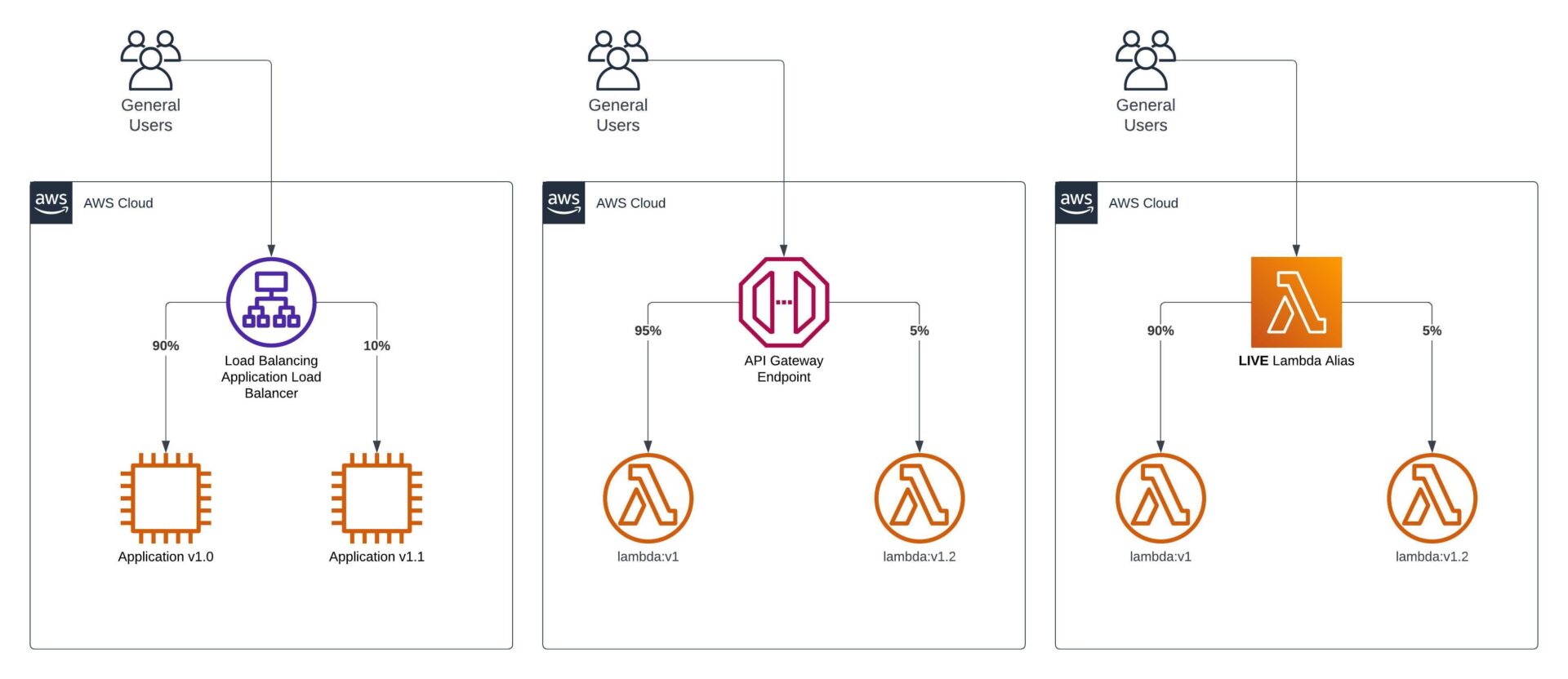
Let’s start with API Gateway. With API Gateway (only REST APIs supported), it’s possible to configure a canary deployment when publishing a new deployment to a stage. This allows you to override stage variables on a small percentage of requests. For example, you can override the stage variable that defines the Lambda function’s integration version, changing it from 9 to 10 to test the new version before a full rollout.
Sticking with the serverless theme, onto Lambda functions and Step Functions workflows. Lambda functions support aliases, most importantly weighted aliases. You may typically see an alias like live pointing at a particular version. With weighted aliases, you can extend this to point at a second version, directing a percentage of invocations towards said second version. Executions of Step Functions workflows can be controlled in a similar way. With the recent introductions of versions and aliases, alias routing can be configured. An advantage of controlling traffic shifting at this level rather than the API is that it also supports direct executions or invocations of a resource.
For ECS, EKS or EC2-based applications, you’ll likely be using an Application Load Balancer (ALB). ALB listener rules support the specification of weighted target groups and additionally support sticky sessions, unlike the other methods we’ve looked at so far.
CloudWatch Evidently
As well as shifting traffic between two deployed versions of an application, there are tools available for running experiments whilst still serving traffic from the same deployed version of an application. Amazon CloudWatch Evidently is one such tool.
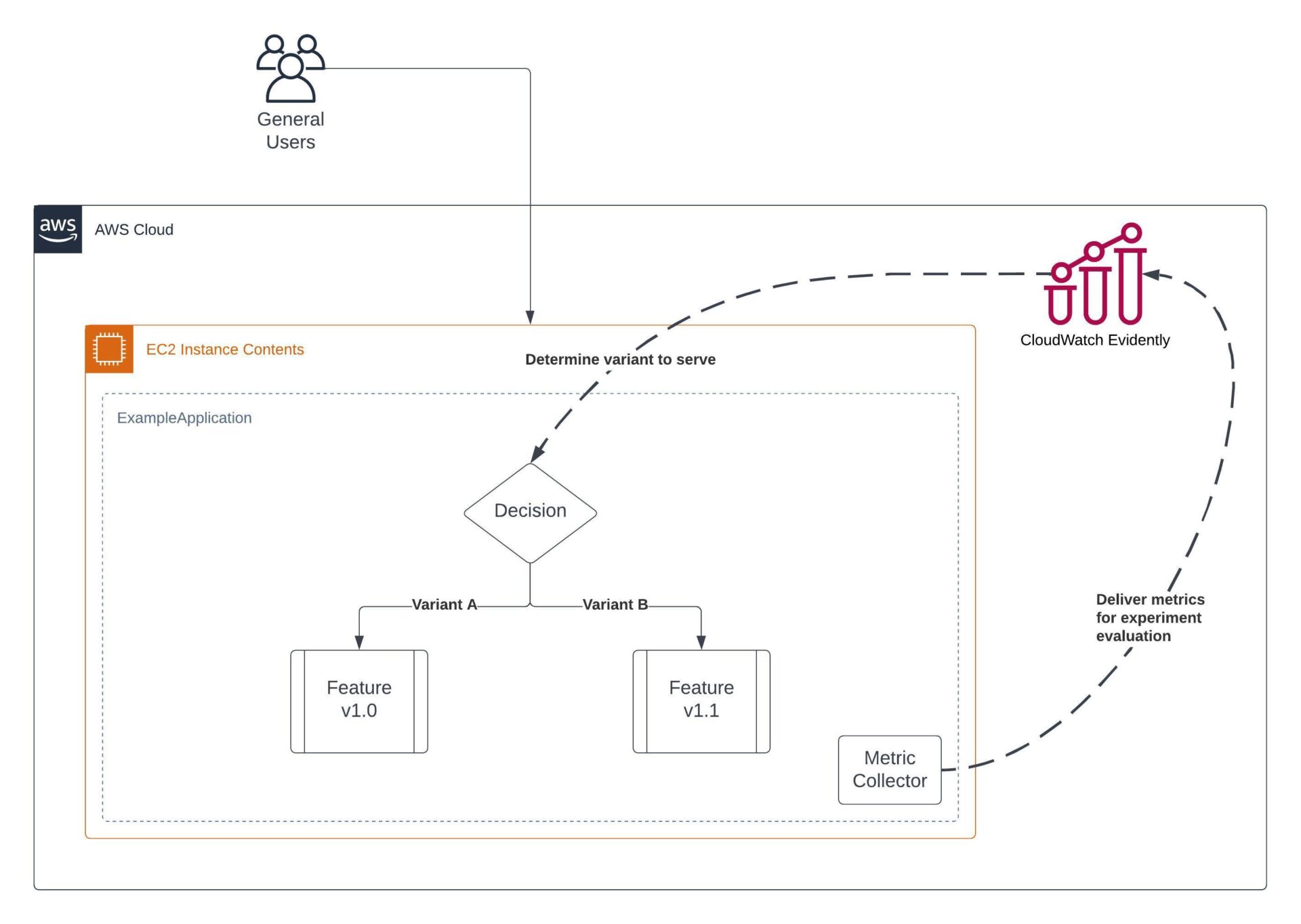
Within CloudWatch Evidently exist the concepts of Projects, Features, Experiments and Launches. Projects provide grouping mechanism of the remaining three, Features represent a feature in an application, Experiments allow you to conduct A/B tests and Launches enable the ability to roll out new features to an audience gradually.
If you’re thinking “isn’t this just the same as traffic shifting?“, then you’re mostly right. One segment of users receives one variation, while a different segment receives another—this concept is common to both. However, there are differences in their intended use and in their specifics. CloudWatch Evidently performs really well in use cases where teams need to test or release a slight variation in functionality while gathering detailed metrics to evaluate its success. It’s definitely a lighter-weight solution than shifting traffic via something like an Application Load Balancer and as a result helps with shortening the feedback loop.
Think of it as this – CloudWatch Evidently is for launching and experimenting with new features without physically shifting traffic to a different EC2 instance, ECS task, Lambda function or Step Function state machine. The shift is made inside the source code of the application, rather than at the outermost interface.
Everything in this service is linked to data. The launches and experiments run collect metrics that can trigger alarms. The data is then nicely accumulated into a dashboard for you to analyse post experiment. We know data is key to running experiments that enable failing fast, so it’s good to see it as central to this service.
AWS Fault Injection Simulator
Chaos engineering is a well-known method for testing a workload’s resilience, or an overall disaster recovery strategy. But what part can it play in empowering developers to fail fast? Think of chaos engineering as something that can both prompt as well as prove an experiment.
Perhaps you’ve tried to assess the resiliency of your application against single Availability Zone (AZ) failure and found that there’s one component that isn’t currently up to scratch. This can prompt an experiment to determine if said component can be successfully deployed across multiple AZs.
Chaos engineering can also be used as the method of an experiment. Perhaps you’ve hypothesised that an improvement you’ve made to your infrastructure increases resiliency and you want to verify that it actually does. You can then use chaos engineering to deliberately introduce failures in select areas of your architecture to simulate a real-life incident.
AWS Fault Injection Simulator (FIS) is a managed chaos engineering service. FIS supports a variety of different failure actions, from running commands on ECS tasks or EC2 instances to simulate increased resource usage all the way to preventing any network traffic into or out of an AZ to simulate a zone failure.
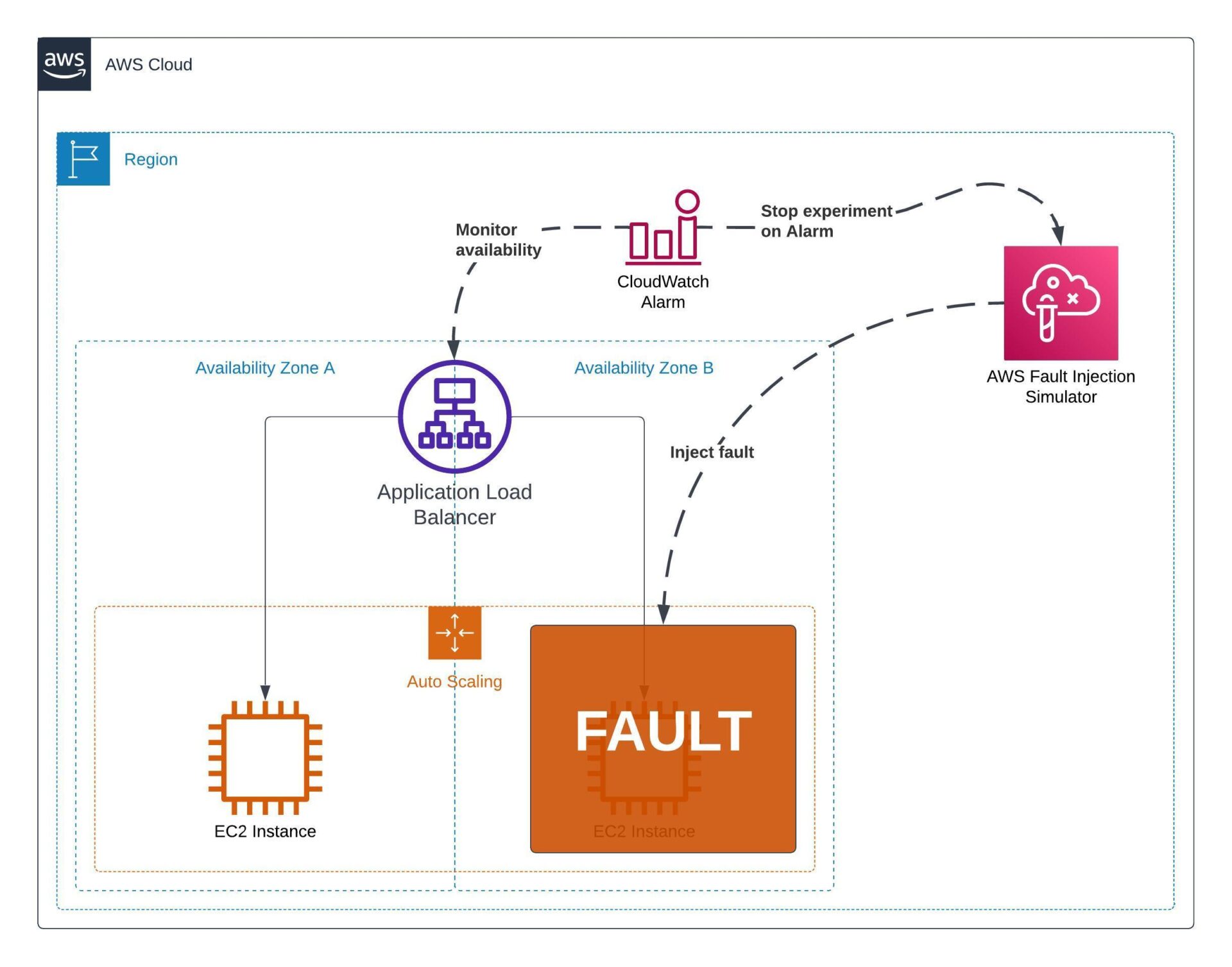
Within AWS FIS, you can define experiment templates, which makes it easy to run the same experiment repeatedly after deploying small infrastructure changes. It’s a great tool to build into the culture of regular resilience testing. Experiments can be targeted at specific resources or more broadly through the use of resource tags.
Summary
We’ve looked at the theory of why and how to run experiments and some of the AWS tools that can help us do so.
Experiments can form part of a migration and modernisation strategy, particularly modernisation. Once an application is within AWS, the journey to becoming cloud-mature begins. Through the use of experiments and embedding a culture of continuous improvement, modernisation can be an iterative journey, delivering value quickly and efficiently. Learn more about how to successfully migrate to AWS in this article.
Are you looking for an expert to review your current architecture and help identify areas where it could better adhere to best practice? A Well-Architected review sounds like it’s for you. Learn more about how Devoteam can help with adherence to AWS best practices.