As a technical leader and software architect, I’ve seen firsthand how the rapid evolution of AI, particularly tools like GitHub Copilot, has started to redefine the day-to-day workflows of software development teams. From automating boilerplate code to augmenting architectural decision-making, Copilot isn’t just a developer’s assistant; it’s quickly becoming a strategic asset for teams aiming for higher velocity and quality.
The integration of AI into development workflows is more than a passing trend. It’s a paradigm shift. Tools like Copilot offer real-time assistance that blends context-aware suggestions with learned best practices, helping teams write cleaner, more reliable code with greater speed and confidence. This article aims to illustrate how both software leaders and developers can harness AI not just for productivity, but for improving the entire software delivery lifecycle.
Download Now: Free Microsoft Cloud Trend Report
[Updated for 2025]
What is Github Copilot?
GitHub Copilot is an AI-powered code completion and programming assistant developed by GitHub in partnership with OpenAI.
GitHub Copilot’s core functionality centres around providing real-time code suggestions and autocompletions as you type, while also being capable of generating entire functions, classes, or code blocks based on comments or partial code you’ve written. The tool supports dozens of programming languages. It includes Python, JavaScript, TypeScript, Ruby, Go, PHP, C++, and many others, and integrates directly into popular code editors like Visual Studio Code, Neovim, JetBrains IDEs, and Visual Studio to provide a seamless coding experience.
Part 1: GitHub Copilot for Software Leaders and Architects
Strategic Use of AI as a Force Multiplier
AI in development environments acts as a force multiplier. From a strategic perspective, this means development teams can be more productive, reduce cognitive overhead, and focus on delivering business value faster.
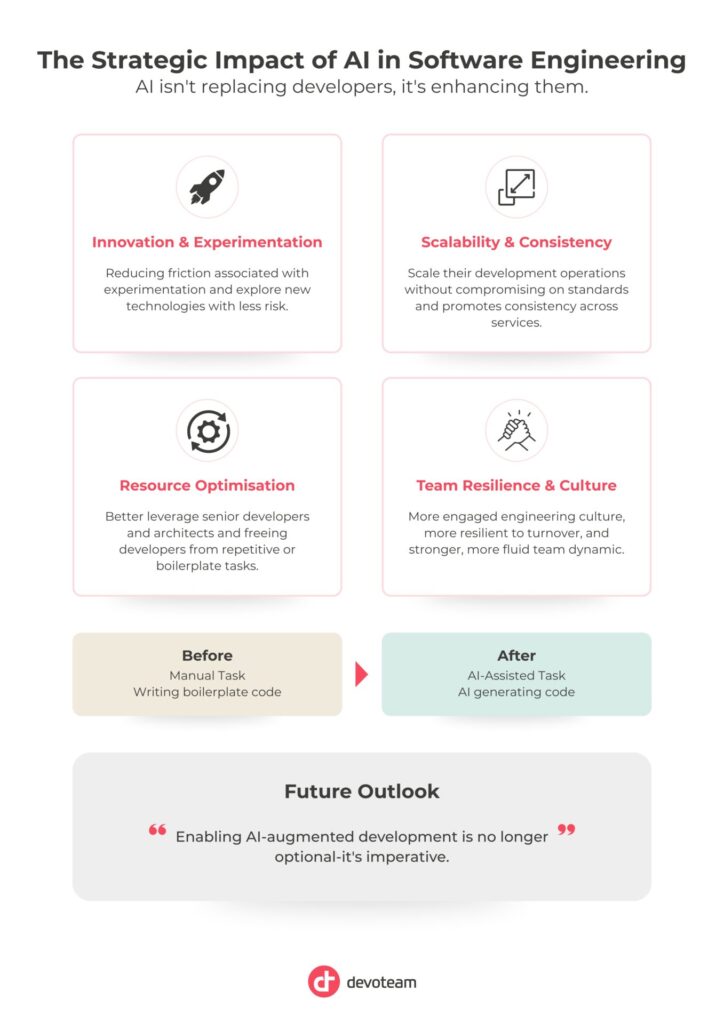
More importantly, AI helps bridge the gap between vision and execution. Software leaders often define high-level strategies and architectural directions that rely on consistent implementation across distributed teams. Copilot facilitates this consistency by embedding patterns, enforcing conventions, and reducing variation in code quality. This alignment allows organisations to scale their development operations without compromising on standards.
Additionally, AI encourages innovation by reducing the friction associated with experimentation. Teams can explore new technologies, frameworks, or design patterns with less risk and time investment. Copilot can provide just-in-time suggestions, examples, or scaffolding code that make prototyping more accessible, even in unfamiliar domains.
By freeing developers from repetitive or boilerplate tasks, AI empowers them to focus on higher-order challenges, such as system design, scalability, performance optimisation, and user experience. This elevation of developer focus results in higher-quality outcomes and a more engaged engineering culture.
From a resource allocation standpoint, organisations can better leverage senior developers and architects to mentor, architect, and design rather than firefight minor issues or fill in gaps left by inconsistent coding practices. Copilot acts as a technical equaliser, lifting the entire team’s baseline competence.
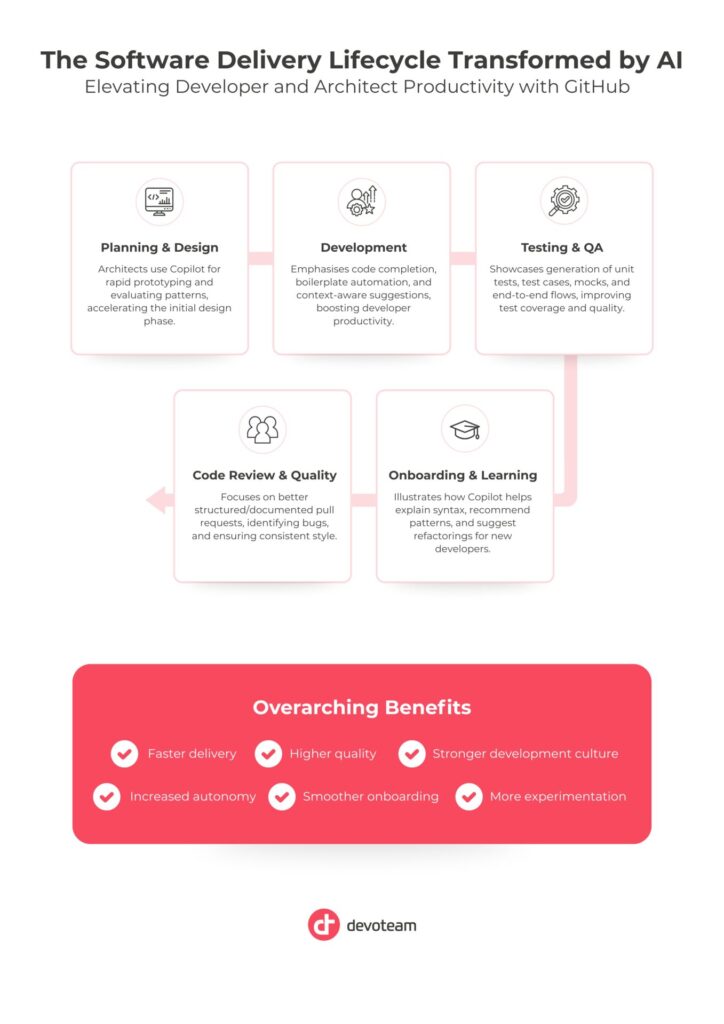
Use Case: Bootstrapping a New Microservice
When starting a new microservice in a distributed architecture, Copilot can generate scaffolding for controllers, service layers, DTOs, configuration files, health checks, and even OpenAPI documentation. Instead of spending hours writing foundational code, developers can focus on domain-specific logic and integration points. This accelerates time-to-market, promotes consistency across services, and ensures better adherence to organisational patterns and standards.
Use Case: Evaluating Messaging Patterns
An architect evaluating the suitability of event-driven versus request-response communication models can use Copilot to rapidly prototype both patterns. For instance, Copilot can:
- Generate Kafka or RabbitMQ producer/consumer templates
- Create examples for retry and dead-letter handling strategies
- Outline integration touchpoints between services
- Demonstrate how observability can be implemented differently depending on the pattern
This empowers architects to validate decisions with practical insights, improving solution design while reducing reliance on theoretical comparisons alone.
Use Case: Supporting Strategic Initiatives
In cloud migration, domain-driven design, or legacy modernisation efforts, Copilot assists by generating adapters, mapping layers, and configuration templates. This reduces the manual overhead of transformation work and allows teams to move faster with greater confidence.
Part 2: GitHub Copilot for Developers and Engineering Teams
Copilot as a Daily Companion for Developers
For engineers, Copilot becomes a silent pair programmer. It helps maintain productivity, enforce best practices, and reduce friction when working with unfamiliar APIs or complex logic.
Beyond simply accelerating code writing, Copilot assists developers in navigating common challenges they face throughout the day. Whether working on bug fixes, implementing new features, or conducting refactors, Copilot provides real-time context-aware suggestions that adapt to the surrounding codebase. This leads to reduced context switching and fewer interruptions in developer flow.
Copilot also enhances confidence when dealing with unknowns—be it a legacy codebase, a third-party SDK, or a new architectural pattern. Developers can explore solutions incrementally while receiving intelligent suggestions that reinforce correctness and guide decision-making. This leads to faster onboarding on new projects and better handling of edge cases.
Importantly, Copilot supports cognitive ergonomics: by offloading mentally taxing but repetitive work, developers can conserve their mental energy for more creative and impactful tasks, such as solving architectural problems or improving user experience.
In pair-programming or collaborative settings, Copilot complements the team dynamic by speeding up mundane coding tasks. It allows human collaborators to focus on higher-level discussions and joint problem-solving. It also helps maintain momentum during mob programming, design sessions, or technical spikes.
Ultimately, Copilot enhances developer autonomy without compromising collaboration—making individuals more effective while contributing to a stronger, more fluid team dynamic.
Use Case: Improving Pull Request Quality
Copilot supports developers during code authoring by suggesting cleaner implementations, identifying potential bugs early, and promoting consistent style. This results in pull requests that are:
- Better structured and documented
- Accompanied by relevant test coverage
- Less prone to common logic or syntax errors
This contributes directly to a more efficient and constructive code review process. Senior engineers spend less time correcting style or structure and more time engaging in architectural or domain-level feedback.
Use Case: Enhancing System Testing and Quality Assurance
AI-driven tools like GitHub Copilot significantly improve how teams approach testing. Copilot can assist in:
- Generating unit test scaffolding using frameworks like xUnit, NUnit, or JUnit
- Suggesting test cases based on method signatures and business logic
- Creating mocks or stubs for external dependencies
- Building end-to-end test flows, especially for RESTful APIs or front-end components
This accelerates test coverage, reduces manual effort, and ensures that quality practices are embedded from the start.
Use Case: Developer Onboarding and Learning
For junior developers or engineers transitioning to new stacks, Copilot reduces the barrier to entry. It can:
- Explain unfamiliar syntax
- Recommend usage patterns
- Suggest refactorings aligned with clean code principles and SOLID design
This shortens the learning curve and supports continuous skill development within the team.
Conclusion
AI isn’t replacing developers or architects—it’s enhancing them. As technical leaders, our role evolves to focus on enabling teams to leverage these tools effectively. GitHub Copilot, when integrated thoughtfully into the workflow, becomes more than a coding assistant. It’s a catalyst for better software design, faster delivery, and stronger development culture.
Beyond the individual productivity gains, the strategic benefits of AI integration ripple through the organization: onboarding becomes smoother, knowledge sharing increases and experimentation becomes more accessible. Development teams become more autonomous, more resilient to turnover, and better equipped to scale and adapt to shifting business needs.
For companies seeking a competitive edge in innovation and agility, enabling AI-augmented development is no longer optional—it’s imperative. The challenge for leaders now is not whether to adopt these tools, but how to integrate them responsibly and effectively.
The future of software engineering is not just about writing code faster—it’s about thinking and building smarter. With AI by our side, we’re entering a new era of augmented development—one where creativity, quality, and velocity are no longer trade-offs, but synergistic outcomes of intelligent tooling.