

This post focuses on the ‘Anticipate failure’ design principle, which is contained in the Operational Excellence pillar of the AWS Well-Architected Framework.
It will explore Murphy’s law in the context of AWS, discussing various topics ranging from simple auto-healing and scaling of an EC2 instance to full multi-region disaster recovery. Two scenarios will be posed: an SMB SaaS application and a business-critical enterprise application. Decreasing tolerance to failure comes with different recommendations and strategies.
It’s important to note that not every application needs complex multi-region deployments, but architecting with global resilience in mind is something that most would benefit from. Whilst it may not be needed now, it encourages best practices and removes obstacles to future growth.
AWS Well-Architected Failure: Background
Before we discuss the scenarios mentioned, let’s review some background to ensure we’re all on the same page.
Types of redundancy
There are two types of redundancy to discuss here: inter-regional and intra-regional. Let’s start with intra-regional.
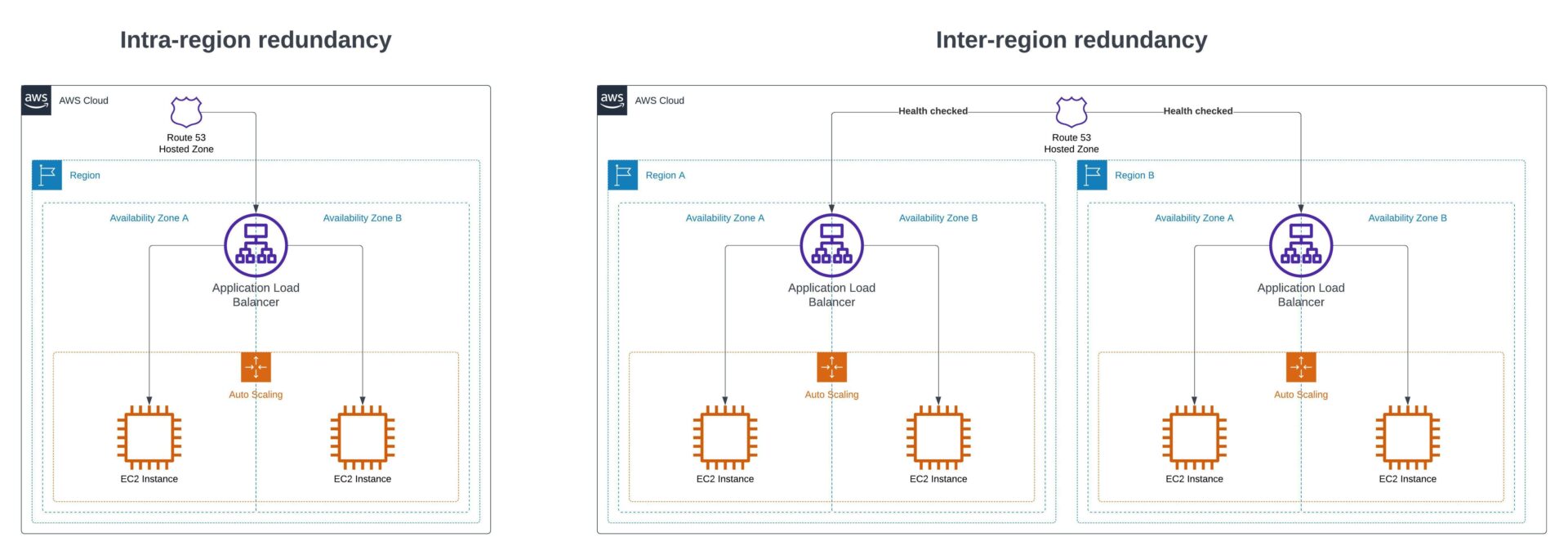
Example architectures using intra-region and inter-region redundancy. Source: Ubertas Consulting.
Intra-regional
Intra-regional redundancy refers to an application being only as resilient as a single AWS region. In real terms, this setup offers significantly more redundancy than a single on-premises data centre because an AWS region comprises multiple data centres, also known as Availability Zones (AZs). AZs are built so that the failure of one or more data centres within a region won’t disrupt the entire region’s service. You can deploy an application cross-AZ (i.e., into multiple data centres) to protect it against single points of failure.
For most applications built on AWS, it’s recommended to employ this type of redundancy. The chances of an entire region becoming unhealthy are very slim and acceptable to many organisations. Many AWS services will automatically give you redundancy across all AZs in a region. For example, Amazon S3 will store your data across multiple AZs at no additional cost, without you having to specify which AZs to store your objects in.
Inter-regional
Inter-regional redundancy means you deploy the application across multiple regions. Typically, organisations utilise this type of redundancy for mission-critical applications where even the remote possibility of an entire AWS region becoming unhealthy is unacceptable. Deploying across multiple regions brings benefits and opportunities, but also brings additional complexities. A handful of AWS services do integrate nicely across multiple regions. Still, there are some things to consider, such as replication lag within the context of database services.
AWS Well-Architected Failure: Disaster recovery strategies
When you want to increase an application’s resilience, you can use a number of architectural strategies. You can apply all of these strategies both inter- and intra-region. However, typically, disaster recovery (DR) tends towards inter-region (i.e. a different region to the application). We’ll review them in increasing cost and decreasing return to operation (RTO) and recovery point objective (RPO) times.
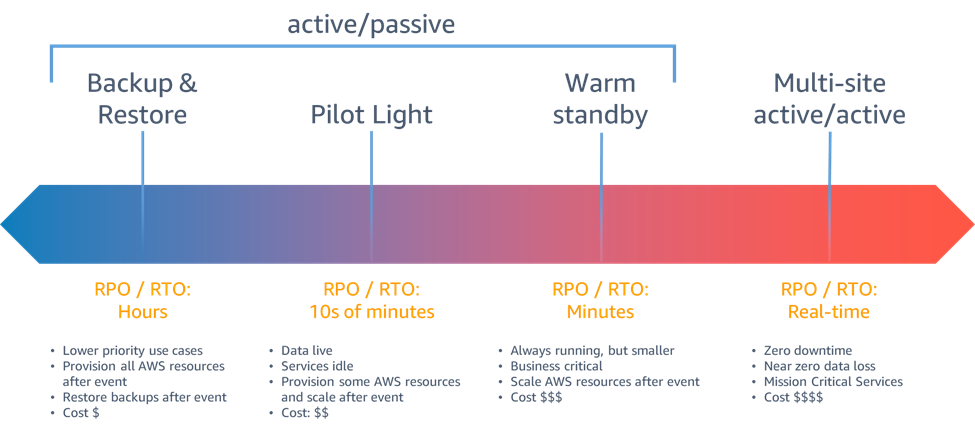
Disaster recovery (DR) strategies. Source: AWS.
Backup and restore
This is the closest to your “traditional” DR strategy. Remember the old 3-2-1 backup strategy? Three copies of data, two on different storage types and one on-site. Your teams can back up data to a location separate from the application’s deployment. In the disaster recovery location, you don’t provision or configure any infrastructure, and the disaster recovery process involves setting up the infrastructure and restoring the backups onto it.
Pilot light
Compared to backup and restore, the pilot light strategy takes a step up by configuring some infrastructure without necessarily provisioning it. For instance, you might configure an ECS service but not run any application instances. This approach shortens the RTO by removing the need to deploy boilerplate configurations, and it keeps costs down because you don’t deploy infrastructure.
Warm standby
With warm standby, you not only configure infrastructure like in the pilot light strategy, but you also provision a minimal amount of it. If an application’s production specification is 4 tasks running in an ECS service, the warm standby might have 1 task running. This strategy is the first that could functionally serve any traffic, just not at the scale of production.
Active/Active
This is the most expensive strategy, but comes with the shortest RTO and RPO timeframes. Unlike strategies like backup and restore, data replication is near-real-time. By taking warm standby a step further, you operate production-scale infrastructure engineered to handle full production traffic immediately. As you might expect, most organisations would recoil at the idea of doubling an application’s infrastructure cost. You’ll normally find this strategy reserved for the most mission-critical of applications.
Scenario 1: An SMB SaaS application

The first of our scenarios is an SMB SaaS application. It’s an application that allows people to upload photos of their expense receipts, add some information and share it with their manager for approval.
This application is currently deployed to a large shared virtual private server (VPS). In terms of resiliency, this is about as bad as it gets. Because you deploy only one copy of the application, a server failure would require manual intervention to restore it, making SaaS application customers wait.It’s not a mission-critical application, so it’s not the end of the world, but it is less than ideal.
Improving with AWS
So, how could this be improved with AWS? The most comparable piece of infrastructure to a shared VPS would be an EC2 instance. Let’s run with that. Similarly to VPS’, an EC2 instance won’t give you resiliency on its own. An architecture with one large server rather than lots of small servers (horizontally scaled) needs to change to really improve this.
To accomplish what we want to do, we need to bring in EC2 Auto Scaling. EC2 Auto Scaling lets you configure a minimum, maximum, and desired count of EC2 instances for launch. Scaling policies can automatically do this (for example, adding an instance when average CPU utilisation exceeds 75% for 5 minutes), or you can do it manually if you predict demand. Auto Scaling also supports replacing unhealthy instances when they have failed. By configuring these scaling groups to spread instances across multiple AZs, you reduce exposure to single AZ failure and increase resilience.
Now, there are some things to keep in mind with this.
Every time an instance is launched or replaced, it gets a new IP address. This means that DNS records end up out of date very quickly. You could do something clever with updating DNS zone records at various points of an EC2 instance lifecycle, but it’s messy and adds more things to go wrong. The best way to architect this is to use an Application Load Balancer and Target Groups. This will allow you to expose one endpoint for the application (the load balancers), and then the target groups keep track of the healthy instances to direct traffic to.
Something else to keep in mind is that your application servers themselves need to be stateless. This means that no data should be stored on the instance itself that you cannot afford to lose. If you have files generated by users, look to use Amazon S3. If you have a database then use Amazon RDS or Aurora. Decoupling stateful data from your application servers is key here.
Scenario 2: A business-critical enterprise application

Let’s imagine that we’ve got an enterprise scale financial application that handles the processing of trades for customers in the UK. The application is currently deployed on-premises to a single data centre in London. At a high level, the architecture is quite simple. It is a Java application with a PostgreSQL database for relational data. Generated documents are stored on a file server.
This application is mission-critical, and any extensive downtime risks fines from the regulator. As a result, it has been decided that the application will be migrated into AWS to ease the journey to increased resiliency.
Migrating the application into a single AWS region (e.g London) could massively increase its resilience; however, some argue that deploying to only one region still leaves a higher risk of downtime than they can tolerate. For this reason, when they migrate the application, they will deploy it to London as the primary region and Ireland as the secondary. But what disaster recovery strategy should they use?
We know that downtime is allowed, but not for long. This rules out backup and restore or pilot light strategies. The choice between warm standby and active/active hinges on comparing infrastructure costs with potential fine costs. For the sake of this article, we’ll assume the fines are too large, thus necessitating active/active.
At its core, the architecture can look similar to that of the SMB SaaS application. An Auto Scaling Group orchestrates a set of EC2 instances, and an Application Load Balancer fronts them. Amazon Aurora can run the PostgreSQL database that currently runs on-premises, and Amazon S3 can provide scalable and durable storage.
Making it multi-region

AWS Regions across Europe. Source: AWS.
If it was only running in one region we could leave the architecture at that. Auto Scaling groups would handle launching instances across multiple AZs, S3 is durable across all AZs by default, and Aurora could be configured with instances in multiple AZs.
So, how do we make it multi-region and handle failovers? There are three key areas to make changes to.
Replication of data in Amazon Aurora
First of all, you need to think about how to make the transactional data stored in Amazon Aurora (PostgreSQL) accessible from the secondary region. To do this, we’ll use Aurora Global Databases. This setup works because multiple clusters deploy across multiple regions, but only the primary region can perform write operations. If the primary region fails, someone can make an API call to initiate the global database failover process. This makes the read-only cluster in the secondary region the primary. This is a similar methodology to read replicas; however, Aurora Global Databases provision entirely separate clusters, allowing you to failover without having to wait for the provisioning of new infrastructure.
Provision infrastructure in another region and update DNS
Next up, the same infrastructure that’s deployed in the primary region needs to be deployed into our secondary region. As we’re aiming for an active/active DR strategy, the capacity and sizing of the infrastructure should be the same. (If we were opting for warm standby then we’d have the same infrastructure but scaled down.) Once deployed, we can update the Route53 DNS record to point at the Application Load Balancer in both regions, and use Route53 Health Checks to determine when to return the value for the secondary region.
Replication of data in Amazon S3
Last of all, we’ll set up bi-directional S3 cross-region replication between our primary region (London) and secondary region (Ireland). This ensures that data copies across in real time. You should configure the application deployed in the secondary region to write to the bucket in its own region. This, along with the bi-directional replication, will ensure that when the primary region returns to full health, it automatically replicates the data back, ready for switchover.
Where do I go next?
If you’re currently running applications on-premises and need greater resiliency, then you’re looking for a migration into AWS with modernisation. Learn how to successfully migrate with AWS in this article. The Migration Acceleration Program (MAP) is a great way to make your investment go further by utilising AWS funding specifically for these scenarios. It’s a straightforward way to get started on the journey to being more resilient to failure.
If you’re already in AWS and looking for an expert eye to help you identify where your architecture could be improved to make it more resilient, a Well-Architected Framework Review sounds like the perfect exercise for you. These are cost-neutral and give you dedicated time with a Solutions Architect to talk through and review your infrastructure and then help get started with remediating their findings.
Contact our experts and start your migration journey with AWS.