


SageMaker Unified Studio is a centralised environment that streamlines the use of multiple AWS services. Currently available in preview across nine regions—including Europe (Paris)—it represents a significant step forward in unifying AWS’s data and AI tooling.
Are you an AWS user curious about what the new SageMaker Unified Studio can do for you? While Amazon SageMaker has traditionally been associated with AI and machine learning, this new unified experience extends its scope to include data processing, analytics, and collaboration.
I discovered this new interface during an AWS workshop: managed notebooks, direct access to Redshift, Athena, and Bedrock—all integrated into a single environment, offering centralised and secure access to data. It’s a major step toward breaking down silos and simplifying workflows for data professionals.
In this article, I’ll cover:
- The strategic role of SageMaker Unified Studio within the AWS ecosystem
- Its core functionalities across machine learning, analytics, and governance
- Insights and feedback from my initial hands-on experience
SageMaker Unified Studio in the AWS ecosystem
Context
In today’s landscape, where data and AI are at the heart of business strategy, users—whether data engineers, data scientists, or analysts—often need to juggle multiple tools to get their work done.
On one hand, they rely on services like Athena, Redshift, and ETL workflows (such as Glue Jobs or Lambda functions) to process, prepare, and analyse data. On the other hand, they turn to platforms like SageMaker Studio and Bedrock to train and deploy machine learning models and harness the power of generative AI.
However, data is often siloed by use case, and AWS services have historically evolved in isolation—without true convergence between data analytics tools and those dedicated to AI. This is the challenge Amazon aims to solve with SageMaker Unified Studio: an integrated environment designed to accelerate both analytics and machine learning projects in the AWS cloud, while fostering better collaboration across teams and business units.
By giving users access to the most widely adopted services in its ecosystem—from simple analytics to generative AI and machine learning—AWS delivers a platform that:
- Centralises access to data
- Facilitates collaboration across diverse roles (data scientists, engineers, analysts)
- Accelerates end-to-end development of AI solutions
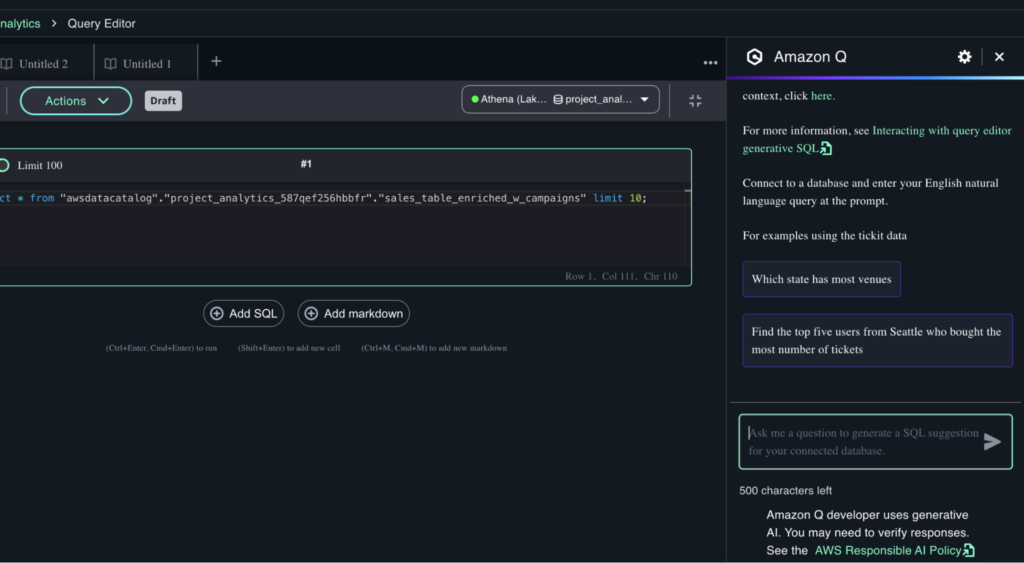
With the integration of Amazon Q Developer—AWS’s generative AI assistant—SageMaker Unified Studio transforms into a smart, interactive environment. It helps users explore data, generate code and SQL queries, and offers context-aware, personalised guidance throughout the workflow.
The New Generation of SageMaker
AWS is evolving SageMaker beyond a pure machine learning service. It evolves into a comprehensive data and AI platform by integrating key services in analytics, artificial intelligence, and governance.
This new generation of SageMaker is built around four core pillars:
- Amazon SageMaker Unified Studio. The subject of this article: a centralised environment for working across analytics and machine learning.
- Amazon SageMaker AI. Consolidates all existing SageMaker capabilities for data preparation, model building, training, and deployment.
- Amazon SageMaker Lakehouse. A solution for centralising and unifying data from Amazon S3, Redshift, and third-party or federated data sources.
Amazon SageMaker Data and AI Governance. A secure platform for discovery, governance, and collaboration around data and AI models, powered by SageMaker Catalog and Amazon DataZone. (For more details, you can refer to this article)
Among these pillars, SageMaker Unified Studio stands out by delivering a consistent and unified user experience. It brings together a range of AWS components under one interface—making it easier for data analysts, engineers, scientists, and even data quality managers to collaborate and access what they need.
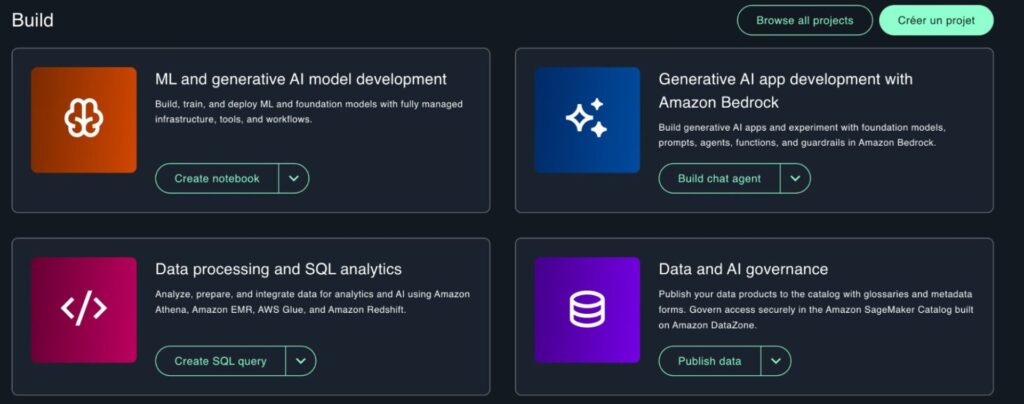
The aim is simple: facilitate access, sharing, and cross-functional collaboration through an intuitive, streamlined interface that adapts to various roles.
From my perspective, Studio adds clear value in at least three key areas:
- Data analysis
- AI and machine learning
- Data governance and security
1. Data Analysis
SageMaker Unified Studio simplifies data exploration and processing by integrating a built-in SQL Query Editor. This allows users to query and interact with data using familiar AWS services.
You can directly access Amazon Athena and Amazon Redshift, two of AWS’s most widely adopted tools for data analytics:
- Amazon Athena is a serverless, interactive service that lets you run SQL queries directly on data stored in Amazon S3, without having to set up or manage any infrastructure.
- Amazon Redshift is a fully managed, petabyte-scale cloud data warehouse designed for high-performance querying and large-scale analytics.
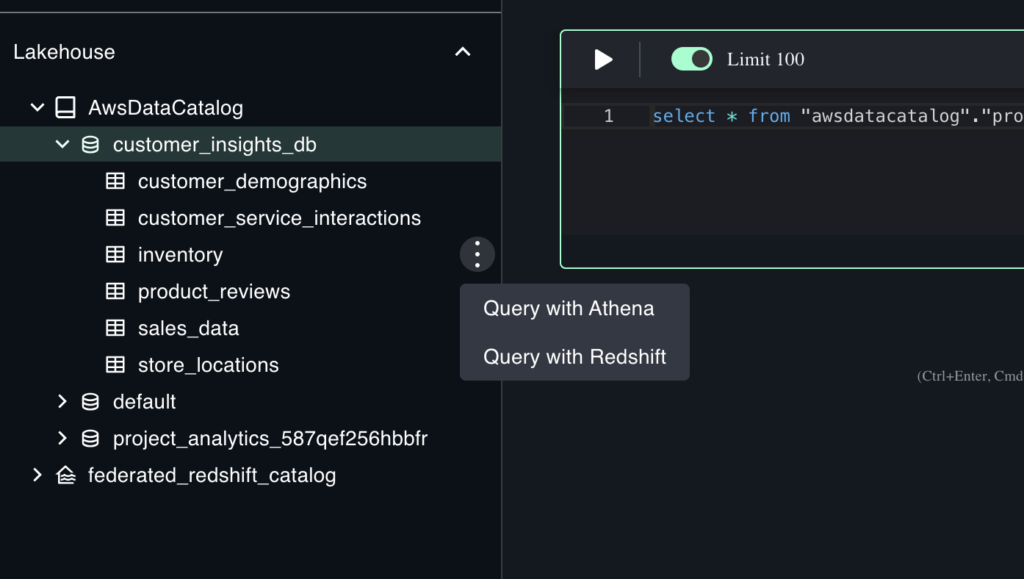
From within the Studio, both services are accessible with a simple click—just use the contextual menu (three dots) next to any table to launch a query, making data retrieval seamless and intuitive.
2. AI and Machine Learning
SageMaker Unified Studio provides everything needed to build, train, and deploy machine learning models—all within a single interface:
Interactive environments: Users can launch JupyterLab, a web-based development environment ideal for writing, organising, and running ML notebooks and workflows.
Accessible LLMs: When setting up an environment, users can choose from a range of foundation models available via Amazon Bedrock, simplifying experimentation with generative AI.
AI-powered assistance: With Amazon Q Developer integrated directly into the Studio, users can ask questions in natural language, explore datasets, and generate code or SQL queries—making data exploration easier and more intuitive.
Generative AI application development: SageMaker Studio also facilitates the creation and scaling of generative AI applications powered by Bedrock and supported by scalable infrastructure.
3. Data Governance and Security
Governance and security are key pillars of SageMaker Unified Studio, ensuring that data access and usage remain secure and compliant:
- Data Catalog: Based on Amazon DataZone, the SageMaker Catalog enables metadata management, schema discovery, and dataset exploration. Users can easily browse available datasets and understand their structure before usage.
- Access control and sharing: The environment leverages IAM and Lake Formation to define fine-grained access controls. Each user only sees the resources they are authorised to access, ensuring secure collaboration and compliance with internal security policies.
By combining these features, SageMaker Unified Studio creates a unified and secure space for working across data analysis, machine learning, and governance workflows—streamlining collaboration and accelerating delivery across teams.
My Feedback on SageMaker Unified Studio
A Unified IDE for Business-Oriented Profiles
One of SageMaker Unified Studio’s main strengths is its fully integrated approach. There’s no longer a need to navigate across multiple AWS services—everything is accessible from a single, centralised environment. Whether for data analysis, transformation, governance, or AI/ML usage, all the necessary tools are brought together into one seamless interface.
This simplification greatly benefits data and AI teams by removing the overhead of interconnecting services and by promoting easier, more secure collaboration and data sharing.
From my perspective, SageMaker Unified Studio is positioned as more than a development environment—an enhanced IDE++ designed to streamline analysis, data mining, and AI tools across teams.
The integration of Amazon Q Developer, AWS’s generative AI assistant, reinforces this positioning. It brings clear value when it comes to simple data exploration or SQL generation, making the platform even more accessible to business profiles. However, for more complex queries or production-grade automation, human oversight remains essential. While helpful, Amazon Q still has limitations in terms of robustness and precision.
For Whom Is It Best Suited?
In my view, this environment is particularly well-suited for profiles that are less focused on infrastructure and low-level development. Thanks to its user-friendly interfaces—like the Query Editor, chat-based exploration, governance tools, and data-sharing features—I see it appealing especially to:
- Data Scientists and Analysts seeking quick and secure access to data
- Business-oriented users who may not be fluent in infrastructure-as-code and prefer working with visual tools and conversational assistants
Meanwhile, more technical users—such as platform engineers or backend developers—will likely continue using traditional AWS services, managed through infrastructure-as-code (IaC) tools like Terraform, CloudFormation, or the AWS CLI.
A Word of Caution on Pricing
While SageMaker Unified Studio offers a compelling integrated experience, cost management is an area to approach carefully.
Although the Studio itself is free to use, as AWS clearly notes:
“Each AWS service that you use through the SageMaker Unified Studio is subject to its own individual pricing. This includes AWS storage and compute services, as well as any third-party services, like Git providers. There is no separate cost for using SageMaker Unified Studio itself.”
In addition, when using the Quick setup option, AWS warns:
“Here is an additional charge for any networking resources that AWS sets up on your behalf if you choose the quick setup option for domain creation, and exact costs depend on account configuration. Delete any unused resources to avoid unnecessary costs. For full visibility into costs during the domain creation process, follow the manual setup option.”
In other words, to avoid unexpected charges, it’s important to:
- Understand the pricing models of the services you interact with (ex: Athena, Redshift, etc.)
- Prefer the Manual setup option when deploying a new Studio domain
- Monitor and clean up unused resources (notebooks, compute environments, networking, etc.)
Final Thoughts
SageMaker Unified Studio provides a modern, collaborative, and intuitive environment that lowers the barrier to entry for many data—and AI-centric roles while still offering power and flexibility. For organisations looking to unify their analytics and ML workflows under a single roof, it’s a promising step forward—as long as cost optimisation and technical governance are kept in mind.