

Written as part of our AI Upskilling Program
This article was created as part of the Global Devoteam AI Upskilling Program, where employees share their knowledge to accelerate their learning. The program’s key objective is to provide a foundation in AI for every employee and apply these new skills in our work. Do you want to work with us? Check out our career opportunities.
Have you ever felt like you’re trying to conduct an orchestra where every musician is playing a different tune? That’s what it can feel like when building sophisticated AI agents. You have all these powerful components, but getting them to work together in a coordinated and predictable way can be a real headache.
If you’ve been following the AI space, you’ve likely heard of LangChain, a fantastic tool for chaining together language models and other components. But as our ambitions for AI agents grow, simple, linear chains are no longer enough. We need something more flexible that can handle the complex, cyclical, and often unpredictable nature of advanced AI interactions. This is where LangGraph comes in.
What is Langgraph?
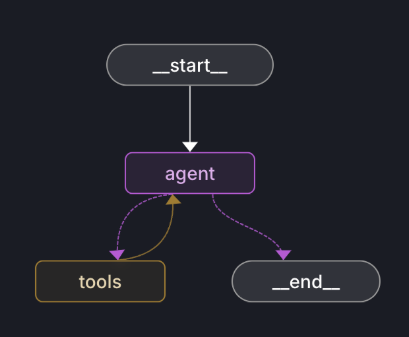
LangGraph is an extension of LangChain that allows you to build your agent’s logic as a graph. Think of the difference between a simple to-do list and a detailed flowchart. A to-do list is great for straightforward tasks, but for a complex project with multiple dependencies and decision points, a flowchart provides a much clearer picture.
The core idea behind LangGraph is that instead of a rigid, one-way street, you have a network of nodes and edges. This approach gives you incredible control and flexibility over your agent’s behavior. By representing the workflow as a graph, developers can create complex, stateful interactions that were previously difficult to manage.

With LangGraph, we’re moving beyond rigid, linear chains. This graph-based approach gives us unprecedented control, allowing us to build more robust and flexible AI systems that can loop, make conditional decisions, and create workflows with multiple specialised agents.

Sami Hamad
AI Consultant & Software Engineer
Building Advanced Agent Workflows with Langgraph
The graph-based approach means you can create loops, allowing your agent to retry tasks or refine its approach based on new information. You can build conditional branches, so your agent can make decisions and take different paths depending on the situation. And you can create workflows that involve multiple agents, where different agents with specialized skills can collaborate to solve a problem.
For example, imagine a logistics company’s AI assistant. A customer might ask, “Where’s my shipment, and can I reroute it to a different address if it’s delayed?” A simple chained agent might struggle with this. But with LangGraph, you could design a workflow where:
- One agent queries the shipping database to find the package’s current location.
- Another agent checks for any reported delays.
- Based on that information, a decision node determines whether a reroute is possible.
- If it is, another agent calculates the new shipping cost and communicates it to the customer.
This kind of complex, stateful interaction is where LangGraph truly shines.
Think of the difference between a simple to-do list and a detailed flowchart. A to-do list is great for straightforward tasks, but for stateful interaction is where LangGraph truly shines.
Why Langgraph Matters for Your Business
The shift from simple chains to dynamic graphs isn’t just a technical detail; it has real impact on businesses looking to leverage AI. The clients we talk to are often concerned about the reliability and predictability of AI systems. They need to know that their AI applications will perform consistently and handle unexpected situations gracefully.
By providing a more structured and controllable way to build agents, LangGraph helps to address these concerns. It allows developers to create more robust and resilient AI systems that are less prone to errors and easier to debug. This means faster development and delivery cycles, more reliable applications, and a better end user experience.
Furthermore, the ability to create multi-agent systems opens up a whole new world of possibilities. We can now build teams of AI agents that work together, each contributing its own specialised expertise to solve complex business problems. From automating financial analysis to managing sophisticated customer support workflows, the potential applications are really vast.
Getting Started with LangGraph
If you’re a developer who has been wrestling with the complexities of building advanced AI agents, I highly encourage you to take a closer look at LangGraph. It has a learning curve because it’s a new way of thinking, but that is exactly why it’s worth the effort when you need to build something reliable.
The best way to start? Don’t try to rebuild a huge agent. Instead, find one small piece of your application that needs to loop back or make a clear decision between two paths. That’s your perfect entry point for building your first graph.
The world of agentic AI is evolving at a breakneck pace. Tools like LangGraph are helping us move beyond the experimental phase and start building truly powerful and reliable AI systems. It’s an exciting time to be in this field, and I can’t wait to see what people will build with these new capabilities.
Over 80% of AI projects fail. Yours don’t have to.
Download our AI Strategy Playbook:
- Learn why AI projects often fail (and how to avoid it).
- Follow 10 clear steps for a strong AI plan.
- Focus on solving business problems (not just using AI).
- Find the best AI uses for your business (includes 100+ examples).
- Learn how to measure AI results (GenAI projects average ~3.7x return).
- Get your tech foundations ready (Cloud, Data, and AI Security).
- Help your team adapt to AI (and see how we train our staff).
- Use AI responsibly (covering fairness, bias, and environmental thoughts).