



Introduction
In my previous blog post, we explored the pros and cons of normalised and denormalised data structures in data warehouses. While normalised data offers advantages such as reduced redundancy and improved data integrity, denormalised structures can lead to faster and more cost-efficient query performance. This is especially true for complex queries due to the reduction in joins. Although denormalisation can increase data redundancy, the performance gains often outweigh the drawbacks, particularly when query speed is essential.
This article explores the advantages of using nested and repeated fields in BigQuery for storing hierarchical data. These data structures can provide significant performance improvements compared to traditional, flattened models. By leveraging nested and repeated fields, you can maintain the benefits of denormalisation while mitigating its drawbacks.
Flattened, Nested and Repeated data in BigQuery
Flattened data refers to a default table structure where data is stored in a non-hierarchical format, with each row representing a single record and its associated attributes. This contrasts with nested and repeated fields, which are great tools for storing data in its original organisation while harnessing the benefits of denormalised data.
Repeated fields can contain multiple values for a single record. They’re ideal for storing hierarchical data in a single table while minimising storage cost.
Nested fields are STRUCTs (structure data type fields in SQL), which are standard SQL data types that can be seen as pre-joined tables within a table. It’s possible to have a repeated STRUCT inside of a table, simulating a 1-many connection to another table but built inside the current one to avoid costly joins by utilising arrays.
In this blog post I explore only this 1-many relationship, therefore all further mentions of BigQuery nested fields refer to repeated STRUCTs.
Both BigQuery nested and repeated fields can be used to preserve the relational qualities of the original data and schema while enabling columnar and parallel processing of the repeated fields.
Through these fields, one can have ONE ROW for each entity and repeated values within that ONE ROW for data at a more granular level.
Query Performance Testing: Flattened vs. Repeated/Nested tables
To get an understanding of the pros and cons of using flattened vs. repeated or nested tables, the columns Commit, Subject and Repo_name from the public dataset table github_repos.commits in BigQuery have been stored in the respective formats.
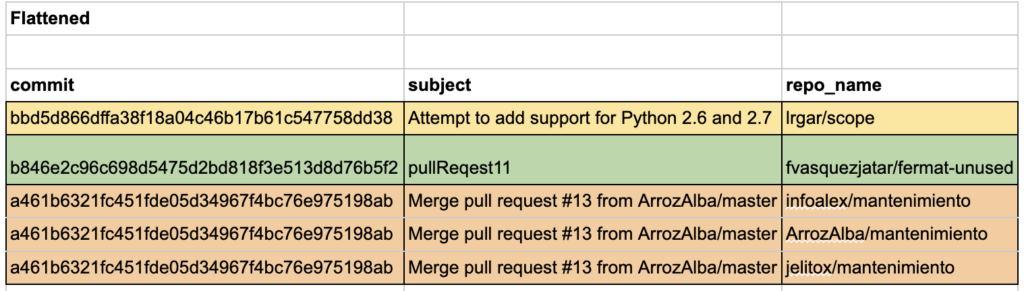
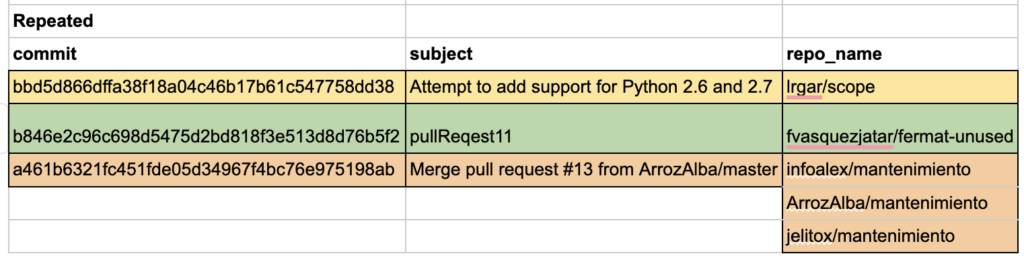
The dataset focuses on the individual commits and a large number of metadata around each. This metadata includes the subject of each commit. You will also find information about the repos in which it can be found. Due to Forks or Cherry-picking of commits, they can be found in a large number of different repositories. The public dataset stores the repos a commit appears in inside an array. For this experiment, they were also stored inside a nested form (an array inside a STRUCT) and a flattened form (commit and subject fields duplicated for each repo belonging to a commit).
Aside from their different formats, the tables also have vastly different sizes. The flattened tables have a size of 427.88 GB, while the nested and repeated tables have “only” a size of 112.28 GB. These demonstrated a much more efficient use of storage while storing all the same data in a single table.
This difference in size has a large impact on storage and query cost. The storage cost for the flattened table is $7.77/ mo, while the storage for each of the optimised tables is $1.89/ mo in the US multi-region used for these experiments.
The queries that were used to create the three different tables for the subsequent performance tests can be found in the appendix.
The Tables have the following formats:

Test Scenarios
To compare the different storage formats, they were tested in three different scenarios and compared based on their query speed and query cost. The specific queries used in the analysis can be found in the appendix.
The three scenarios tested were:
1st Scenario: Simple Filtering
- This scenario tests how quickly you can filter data based on a condition in the repo_name field.
2nd Scenario: Counting Repositories
- This scenario tests how efficiently you can count the number of repositories associated with each commit and subject.
3rd Scenario: Filtering on Multiple Repositories
- This scenario tests filtering based on the presence of multiple specific repositories.
Test Results
Query Speed
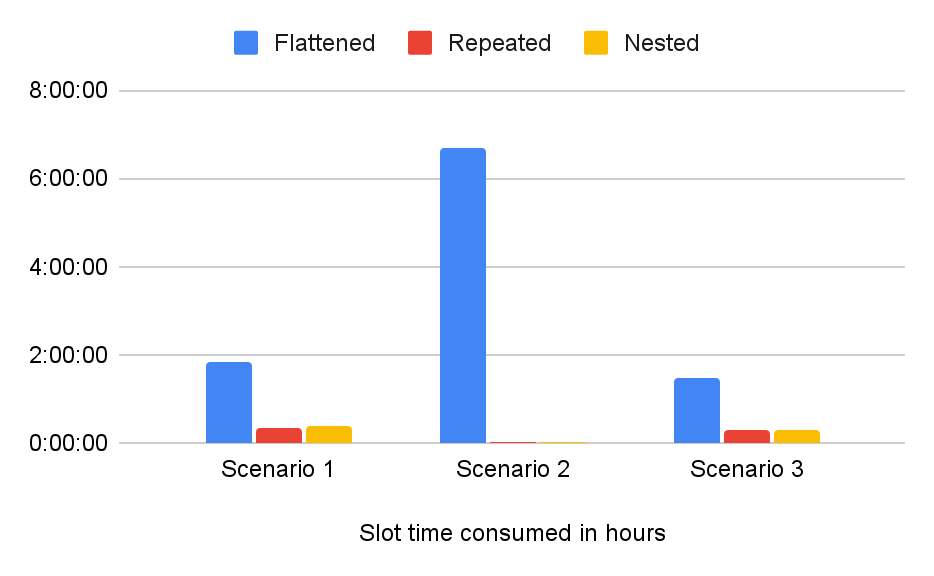
As visible in the charts below, in all cases, the flattened format loses out against the nested and repeated formats. This is to be expected since so many more fields need to be processed during each query. The duration for all queries is impressively low due to BigQuerries parallel computation, but when looking at the Slot time consumed, it’s possible to see how much more effort querying the flattened data is and how powerful BigQuery is at hiding this computation from the user by delivering the results in record speed.
Currently the user doesn’t need to think about slot time consumed because it doesn’t affect the pricing of BigQuery. For now the billing only depends on bytes processed but this is subject to change and there are plans to include slot time consumed into the formula, which will make these differences highly relevant to all users.
The performance of repeated and nested fields appears to be the same, with minor variations between runs. This result is encouraging, as it suggests that there is no performance penalty for storing data in BigQuery nested fields to maintain its original structure.

Query Cost
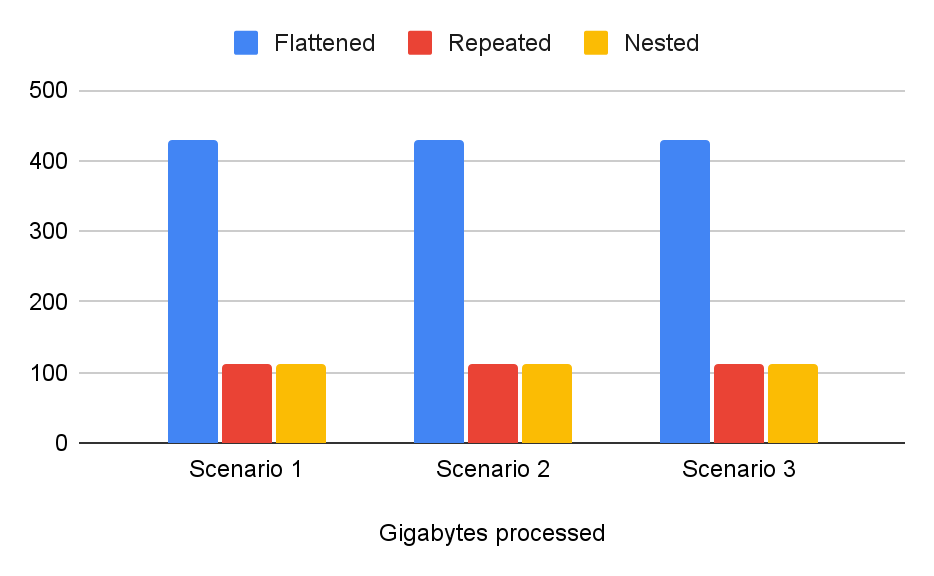
As visible in the chart below, the bytes processed are consistent across all three scenarios since all scenarios need to read the entire tables. Due to the aforementioned large size differences between the tables, the query costs are squally skewed with the queries of the flattened table being much more expensive than the queries of the repeated and nested tables.
Each query of the flattened table (427.88 GB) currently costs $2.67, while querying the other tables (112.28 GB) costs $0.7.
Verdict
BigQuery nested/repeated fields offer significant advantages. In our experience, they reduced storage costs by a remarkable 74% and also decreased query costs.
Initially, we anticipated potential tradeoffs in query speed when using these fields. However, we were pleasantly surprised to discover the opposite was true. The performance improvements were impressive.
Furthermore, storing data in a repeated format enhances readability. It becomes much easier to visually inspect and interpret the information.
Even queries that explore the hierarchical relationship between commits and repositories is simpler to construct and comprehend when the data is stored in this format.
These findings highlight how denormalised tables, enriched with repeated and nested fields, can combine the strengths of both normalised and denormalised data models, without their respective drawbacks.
| Feature | Flattened Data | Nested/Repeated Data |
| Table Size | Larger table size due to data redundancy | Smaller table size due to efficient data storage |
| Storage Cost | Higher storage cost due to larger table size | Lower storage cost due to smaller table size |
| Query Performance | Lower query performance, more fields need to be processed | Higher query performance, fewer fields need to be processed |
| Query Cost | Higher query cost due to larger data size | Lower query cost due to smaller data size |
| Readability | More difficult to read as data relationships are not immediately clear | Easier to read and interpret because data is stored closer to its original structure |
| Data Relationships | Data relationships can be lost due to duplication of fields across multiple rows | Preserves relational qualities of the original data and schema |
Additional resources
Want more BigQuery resources? Check our other blog posts:
- Part one of the optimisation series: Improve BigQuery Performance: Normalisation vs Denormalisation
- How to set up a Cloud Run job to read and write on BigQuery
- 3 ways to protect your BigQuery data with row-level security
- Success Story: How Bambuser optimised their BigQuery costs

Want to optimise your BigQuery data warehouse and slash costs?
Contact our experts and unlock the full potential of your data! In the mood for learning? Explore our data resources!
Appendix
1. Create Tables
Table with repeated data:
CREATE TABLE query_speed_blog.git_commits_repeated AS (
SELECT
commit,
subject,
repo_name
FROM
`bigquery-public-data.github_repos.commits`
);
Table with nested (STRUCT) data:
CREATE TABLE query_speed_blog.git_commits_nested AS (
SELECT
commit,
subject,
STRUCT(repo_name AS name) AS repo
FROM
`bigquery-public-data.github_repos.commits`
);
Table with flattened data:
CREATE TABLE query_speed_blog.git_commits_flattened AS (
SELECT
commit,
subject,
repo_name
FROM
`bigquery-public-data.github_repos.commits`,
UNNEST(repo_name) AS repo_name
);
2. Testing Queries
1st Scenario: Simple Filtering
Flattened Table Query:
SELECT
commit,
subject,
repo_name
FROM
`query_speed_blog.git_commits_flattened`
WHERE repo_name = ‘tensorflow/tensorflow’
Repeated Table Query:
SELECT
commit,
subject,
repo_name
FROM
`query_speed_blog.git_commits_repeated`,
UNNEST(repo_name) as repo_name
WHERE ‘tensorflow/tensorflow‘ = repo_name
Table with nested (STRUCT) data Query:
SELECT
commit,
subject,
repo_name
FROM
`query_speed_blog.git_commits_nested`,
unnest(repo.name) as repo_name
WHERE ‘tensorflow/tensorflow‘ = repo_name
2nd Scenario: Counting Repositories
Flattened Table Query:
SELECT
commit,
subject,
COUNT(repo_name) AS repo_count
FROM
`query_speed_blog.git_commits_flattened`
GROUP BY 1, 2
LIMIT
1000000
Repeated Table Query:
SELECT
commit,
subject,
ARRAY_LENGTH(repo_name) AS repo_count
FROM
`query_speed_blog.git_commits_repeated`
LIMIT
1000000
Table with nested (STRUCT) data Query:
SELECT
commit,
subject,
ARRAY_LENGTH(repo.name) AS repo_count
FROM
`query_speed_blog.git_commits_nested`
LIMIT
1000000
3rd Scenario: Filtering on Multiple Repositories
Flattened Table Query:
SELECT
commit,
subject,
ARRAY_AGG(repo_name) AS repos
FROM
`query_speed_blog.git_commits_flattened`
WHERE repo_name = ‘tensorflow/tensorflow‘ OR repo_name = ‘Intel-tensorflow/tensorflow‘
GROUP BY 1, 2
HAVING count(*) = 2;
Repeated Table Query:
SELECT
commit,
subject,
repo_name
FROM
`query_speed_blog.git_commits_repeated`
WHERE EXISTS (SELECT 1 FROM UNNEST(repo_name) AS name WHERE name = ‘tensorflow/tensorflow‘)
AND EXISTS (SELECT 1 FROM UNNEST(repo_name) AS name WHERE name = ‘Intel-tensorflow/tensorflow’);
Table with nested (STRUCT) data Query:
SELECT
commit,
subject,
repo.name
FROM
`query_speed_blog.git_commits_nested`
WHERE EXISTS (SELECT 1 FROM UNNEST(repo.name) AS name WHERE name = ‘tensorflow/tensorflow‘)
AND EXISTS (SELECT 1 FROM UNNEST(repo.name) AS name WHERE name = ‘Intel-tensorflow/tensorflow‘);